Anti-Aliasing Explained: MSAA, FXAA, SMAA, TAA and DLAA
Why jaggies and shimmering happen, and how SSAA, MSAA, FXAA, SMAA, TAA and ML-based DLAA each try to fix them, with their trade-offs.
Anti-aliasing is one of the oldest settings in any graphics menu, and one of the most confusing. A single game might offer FXAA, SMAA, TAA, DLAA and a “TAA sharpening” slider, with little explanation of how they differ. Each one is a different answer to the same problem, and each makes a different trade-off between sharpness, stability and cost. This guide starts with why aliasing happens at all, then works through the main methods in roughly the order they appeared.
Why jaggies and shimmering happen
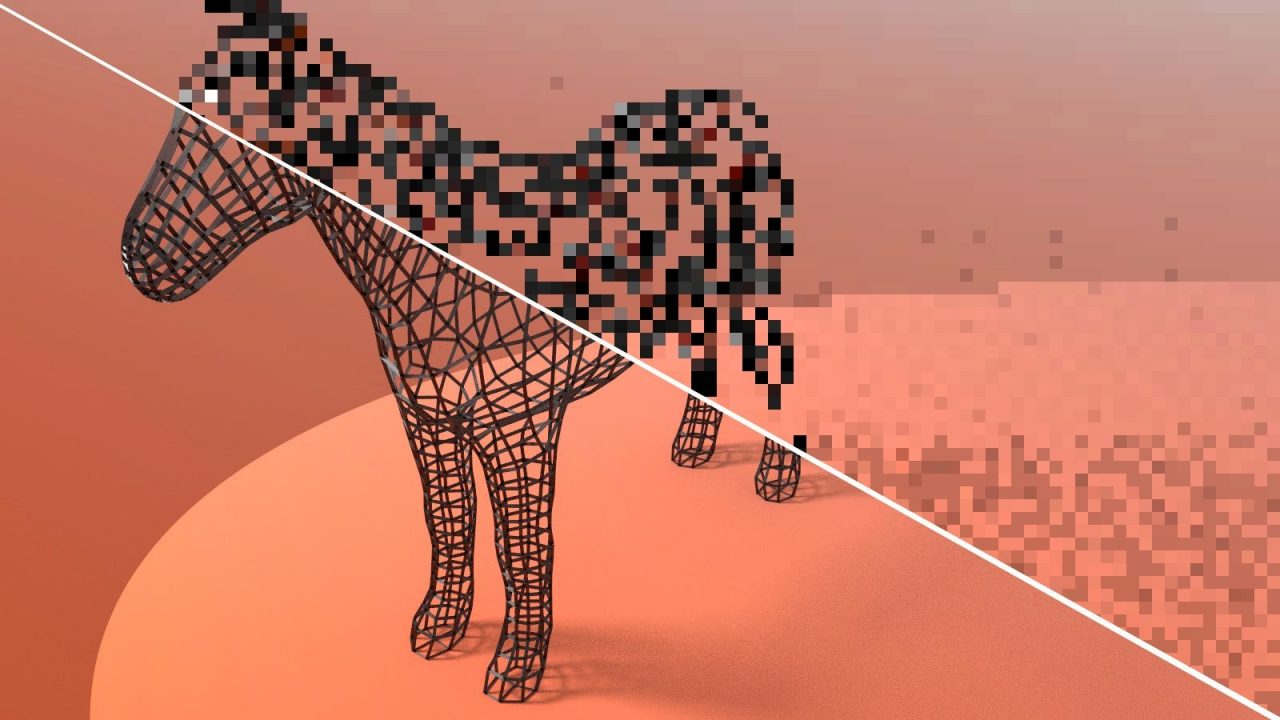
Your screen is a grid of pixels. A 3D scene, by contrast, has smooth edges at any angle and detail at every scale. Rendering converts that continuous scene into a grid by sampling: for each pixel, the GPU checks what lies at a specific point, usually the pixel center, and colors the pixel accordingly.

When an edge crosses a pixel, the pixel is either inside or outside the triangle based on that single point. There is no in-between. The result is the stair-step pattern called jaggies, most visible on near-horizontal or near-vertical edges.
The deeper problem is aliasing in the signal-processing sense. When a scene contains detail finer than the pixel grid can represent, like a distant chain-link fence, thin power lines or high-frequency texture patterns, sampling produces false patterns that were never in the scene. In motion, those patterns change from frame to frame as the camera moves, which shows up as shimmering, crawling edges and flickering highlights. In moving games this temporal aliasing is often more distracting than static jaggies.
Aliasing comes from several sources, which is why no single method fixes all of it:
- Geometric aliasing: triangle edges.
- Texture aliasing: fine texture detail, largely handled separately by mipmapping and texture filtering.
- Shader aliasing: sharp specular highlights and lighting changes within a surface.
- Sub-pixel geometry: objects thinner than a pixel that appear and disappear as they move.
If you want the background on how pixels get produced in the first place, our guide to the rasterization pipeline explains where the sampling step sits.
SSAA: the brute-force reference
Supersampling anti-aliasing (SSAA) is the simplest and most expensive approach: render the image at a higher resolution, then scale it down. With 4x SSAA, each output pixel is the average of four rendered samples, so edges get intermediate shades and fine detail is averaged properly.
SSAA fixes every type of aliasing because every sample is fully shaded. Its cost is equally comprehensive: 4x SSAA means roughly four times the pixel shading work. Today it usually appears as a resolution scale above 100% or as driver features like NVIDIA DSR/DLDSR and AMD Virtual Super Resolution. It remains the quality benchmark other methods are measured against.
MSAA: smarter sampling for edges
Multisample anti-aliasing (MSAA) was the standard for many years. The insight behind it is that most visible jaggies are on geometry edges, and the interior of a triangle usually does not need extra samples.
With 4x MSAA, the rasterizer tests triangle coverage and depth at four sample positions per pixel, but the pixel shader typically runs only once per pixel per triangle. The shaded color is stored for each covered sample, and at the end the samples are averaged. Edges get smooth gradients while the expensive shading cost stays close to that of no anti-aliasing.
MSAA has two weaknesses. It does nothing for shader or texture aliasing inside surfaces, so shiny materials can still sparkle. And it fits poorly with deferred rendering.
Why deferred renderers moved away from MSAA
Around the late 2000s, many engines adopted deferred shading. Instead of lighting each object as it is drawn, the engine first writes surface properties (color, normal, roughness, depth) into several full-screen buffers known as the G-buffer, then computes lighting for every pixel in a separate pass. This makes scenes with many lights far more efficient.
MSAA fits poorly here. Every G-buffer target would need to store multiple samples per pixel, multiplying memory and bandwidth use, and the lighting pass would need to detect edge pixels and light each sample individually. It can be done, but the cost erodes the reason for using MSAA in the first place. Add the rise of post-processing effects and physically based materials with lots of specular shimmer, and the industry went looking for alternatives that worked on the final image.
FXAA and SMAA: post-process edge smoothing
Post-process anti-aliasing works on the finished image, after rendering. It looks for edges using color or luminance contrast and blends across them.
FXAA (Fast Approximate Anti-Aliasing), developed by Timothy Lottes at NVIDIA, is extremely cheap and works on any renderer. It detects high-contrast edges and blurs along them. The downside is that it cannot distinguish an aliased edge from legitimate fine detail, so it softens textures and text across the whole image. It also does little for temporal shimmering, because each frame is processed independently.
SMAA (Subpixel Morphological Anti-Aliasing), published by Jorge Jimenez and colleagues in 2012, builds on earlier morphological anti-aliasing work. It searches for specific edge patterns (L, Z and U shapes) and reconstructs the likely original edge shape before blending. That makes it noticeably sharper and more accurate than FXAA at a small additional cost. Its higher modes can also add temporal and multisample components, but the commonly used “SMAA 1x” preset is still purely post-process, so it shares FXAA’s weakness with shimmering in motion.
TAA: borrowing samples from the past
Temporal anti-aliasing (TAA) is the default in most modern games. The idea is to get supersampling-like quality without rendering extra samples in a single frame, by spreading them across time.
Each frame, the camera is shifted by a tiny sub-pixel offset called jitter, so successive frames sample slightly different positions within each pixel. TAA keeps a history buffer of previous results, uses motion vectors to find where each pixel was in the last frame, and blends the new sample with the reprojected history. Over several frames, each pixel accumulates many samples, which smooths edges and dramatically reduces shimmering on all types of aliasing, including shader and sub-pixel aliasing.
TAA also enables other techniques. Many modern effects, such as some ambient occlusion, volumetric fog and hair rendering, are deliberately rendered noisy or at low resolution and rely on TAA to clean them up. This is why some games look broken when TAA is forcibly disabled.
The trade-offs: blur and ghosting
Reusing history is powerful but risky. When the history is wrong, for example because an object moved to reveal something new, or because motion vectors do not capture a change like a shadow moving, TAA must decide whether to trust the past or reject it:
- Trust it too much and you get ghosting: smeary trails behind moving objects.
- Reject it too readily and the image becomes unstable again.
- Blending many slightly offset samples also introduces softness, especially in motion.
Developers counter this with history clamping, which restricts past colors to the range seen in the current neighborhood, and with sharpening filters. Those are hand-tuned heuristics, and their limitations explain why TAA’s look is so divisive: some players see a clean, stable image, others see a soft one.
Temporal upscalers and DLAA
Temporal upscalers like DLSS, FSR and XeSS are built on the same foundation as TAA. They use jitter, motion vectors and history; the difference is that they also reconstruct a higher output resolution than they render. Each offers a mode that runs at native resolution purely for anti-aliasing:
- DLAA (Deep Learning Anti-Aliasing) from NVIDIA uses the DLSS neural network at 100% render scale.
- FSR Native AA applies AMD’s reconstruction at full resolution.
- XeSS Native AA does the same with Intel’s upscaler.
The machine-learning versions replace TAA’s hand-tuned history rules with a trained model that learns when to keep and when to reject history. In practice that tends to mean less ghosting, better retention of fine detail and more stability on thin geometry than conventional TAA, at a higher cost than TAA. See our explainers on DLSS and FSR for how those models have changed across versions.
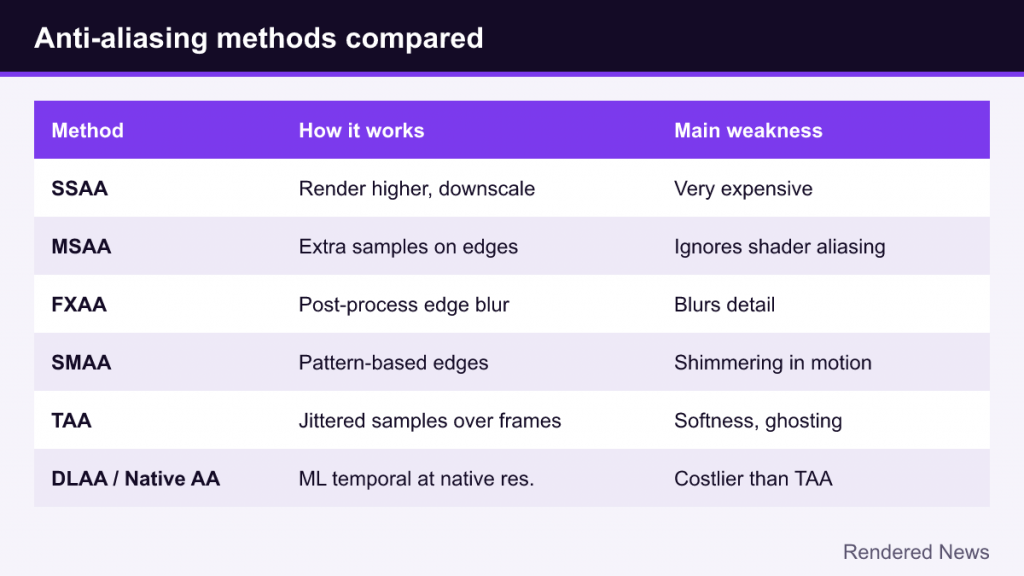
Quick comparison
| Method | How it works | Strengths | Weaknesses |
|---|---|---|---|
| SSAA | Render at higher resolution, downscale | Fixes all aliasing | Very expensive |
| MSAA | Extra coverage samples on edges | Sharp, clean geometry edges | Ignores shader aliasing; poor fit for deferred |
| FXAA | Post-process edge blur | Very cheap, works anywhere | Blurs detail; no temporal stability |
| SMAA | Post-process pattern-based edge reconstruction | Sharper than FXAA, cheap | Limited help with shimmering in motion |
| TAA | Jittered samples accumulated over frames | Stable image, handles all aliasing types | Softness and ghosting |
| DLAA / Native AA | ML or advanced temporal reconstruction at native resolution | Stable and detailed | Costlier than TAA; vendor or hardware dependent |
Choosing a setting
A few general guidelines, without assuming any particular hardware:
- If the game offers DLAA or a native AA mode and runs well, it is usually the cleanest option.
- If you need more performance, an upscaler’s quality mode often looks comparable to native TAA because it already includes temporal anti-aliasing.
- If TAA looks too soft, check for a sharpening slider before switching to FXAA. Disabling temporal AA entirely can expose dithered effects and heavy shimmering.
- In older or forward-rendered games, MSAA can still look excellent and sharp, especially at 4x.
- Higher output resolution reduces aliasing on its own, because pixels are smaller relative to scene detail, but it never eliminates it entirely.
Anti-aliasing has evolved from brute force to clever sampling to post-process tricks to temporal reconstruction, and now to machine learning. Each step came from the same goal: get as close to the supersampled reference as possible while spending as little performance as possible.