What Is DLSS? NVIDIA’s AI Upscaling Explained
DLSS explained: Super Resolution modes, DLAA, Frame Generation, Multi Frame Generation and Ray Reconstruction, plus how versions evolved up to DLSS 4.5.
DLSS started life as a single upscaling feature and has grown into an umbrella brand for several AI-powered rendering technologies. Today a game’s “DLSS” menu might offer upscaling modes, an anti-aliasing option, frame generation with a choice of multipliers, and a ray-tracing denoiser. This guide untangles what each piece does, how the technology evolved from its first version to DLSS 4.5, and which parts work on which generations of NVIDIA RTX graphics cards as of 2026.
What DLSS stands for and the core idea
DLSS stands for Deep Learning Super Sampling. The original promise was simple: render the game at a lower resolution than your display, then use a neural network to reconstruct an image that looks close to, or in some respects better than, native resolution.
Why does that help? Much of a GPU’s work scales with the number of pixels it has to shade. Rendering at 1440p instead of 4K means shading well under half as many pixels per frame. If the upscaled result looks nearly as good, you get a big performance gain for a small visual cost. That headroom is often spent on something else, most commonly ray tracing, which is extremely demanding on its own. If you are new to that topic, our plain-English ray tracing explainer covers why it is so costly.
The neural networks run on Tensor Cores, specialized units for matrix math found on NVIDIA GeForce RTX GPUs. That hardware requirement is why DLSS is limited to RTX cards and is not available on GTX models or on other vendors’ GPUs.
DLSS Super Resolution and its quality modes
The upscaler, officially DLSS Super Resolution, is a temporal technique. It does not simply enlarge a single low-resolution frame. For each frame it receives:
- the current low-resolution frame,
- motion vectors describing how each pixel moved since the previous frame,
- the depth buffer,
- its own high-resolution output from previous frames,
- and a tiny per-frame camera offset called jitter.
Because the camera jitters by a fraction of a pixel each frame, successive frames sample slightly different points in the scene. Combining that history with motion data lets the network accumulate more detail than any single low-resolution frame contains. The AI’s job is mostly deciding which past information to trust and which to discard, for example when an object moves to reveal what was behind it.
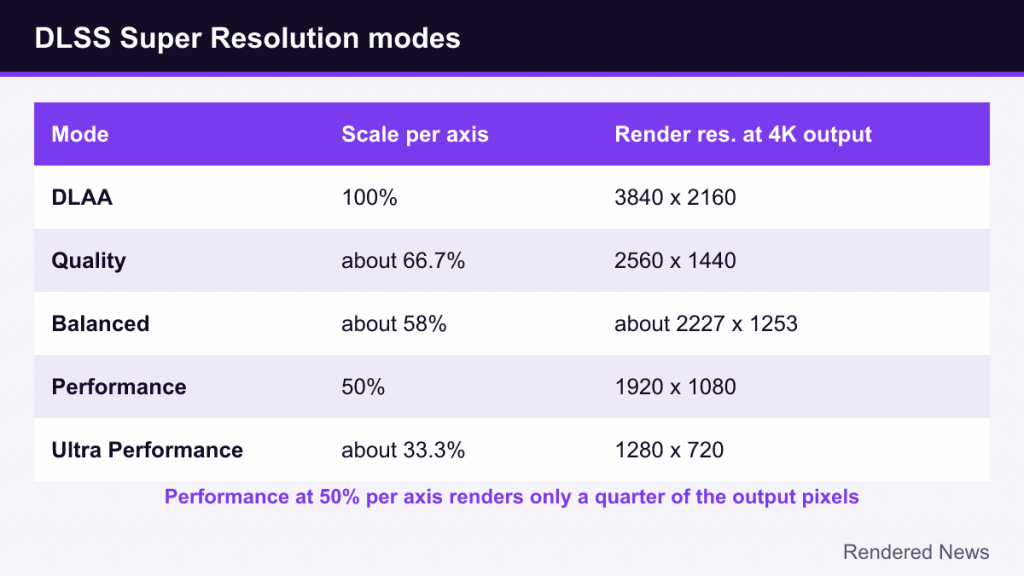
Games typically expose these standard modes, shown with the internal render scale per axis:
| Mode | Render scale per axis | Example at 4K output |
|---|---|---|
| DLAA | 100% | 3840 × 2160 |
| Quality | about 66.7% | 2560 × 1440 |
| Balanced | about 58% | about 2227 × 1253 |
| Performance | 50% | 1920 × 1080 |
| Ultra Performance | about 33.3% | 1280 × 720 |
Note that the percentage applies to each axis. Performance mode at 50% renders only a quarter of the output pixels, which is why the speed-up is so large. Some games also offer an automatic mode that picks a scale based on output resolution, and developers can implement dynamic resolution that adjusts per frame.
DLAA: DLSS without the upscaling
DLAA (Deep Learning Anti-Aliasing) runs the same reconstruction network at native resolution. There is no performance gain from rendering fewer pixels; instead, the goal is better image quality than traditional temporal anti-aliasing, with less blur and shimmering. DLAA arrived in 2021 and is a good choice when a game already runs comfortably fast at native resolution and you want the cleanest edges possible.
Frame Generation and Multi Frame Generation
Super Resolution makes each rendered frame cheaper. Frame Generation, introduced with DLSS 3 in 2022, takes a different approach: it creates entirely new frames and inserts them between rendered ones.
The GPU renders frame A, then frame B, then uses motion vectors, depth and optical flow analysis to synthesize an intermediate frame shown between them. The original DLSS 3 implementation relied on the hardware Optical Flow Accelerator in RTX 40 Series GPUs. With DLSS 4, NVIDIA replaced that hardware optical flow step with an AI model, which it said made the frame generation model faster and lighter on video memory.
Multi Frame Generation, introduced with DLSS 4 at CES 2025, generates up to three frames per rendered frame (4x). DLSS 4.5, announced at CES 2026, raised the maximum to 6x (five generated frames per rendered frame) and added Dynamic Multi Frame Generation, which shifts the multiplier on the fly to match the display’s refresh rate rather than overshooting it.
Two important caveats apply to all frame generation:
- It does not reduce input latency. Generated frames are not driven by fresh input, and holding back a rendered frame to interpolate adds some delay. That is why DLSS Frame Generation is paired with NVIDIA Reflex, which trims latency elsewhere in the pipeline.
- It works best from an already decent base frame rate. Interpolating between frames that are far apart in time produces more visible artifacts and the game still feels as responsive as its base rate.
Ray Reconstruction
Real-time ray tracing fires very few rays per pixel, so the raw result is noisy and needs denoising. Traditionally, games used several hand-tuned denoisers for different effects. DLSS Ray Reconstruction, added in DLSS 3.5 in 2023, replaces those with a single AI model that denoises and upscales at the same time.
The benefit is that the network sees the whole picture: it can keep reflections sharper, preserve lighting detail that separate denoisers blurred away, and react faster when lighting changes. It is most useful in games with heavy ray tracing or path tracing, and it only appears in titles that have specifically integrated it.
How DLSS evolved: 1.0 to 4.5
- DLSS 1.0 (2019): Launched in February 2019 in games like Battlefield V and Metro Exodus. It required training per game and was widely criticized for soft, smeary results.
- DLSS 2.0 (2020): A major rework into a generalized temporal upscaler that did not need per-game training. Image quality improved dramatically, and this is the version that made DLSS widely recommended.
- DLSS 3 (2022): Added Frame Generation, limited to RTX 40 Series GPUs and newer.
- DLSS 3.5 (2023): Added Ray Reconstruction, available on all RTX GPUs.
- DLSS 4 (January 2025): Switched Super Resolution, DLAA and Ray Reconstruction from convolutional neural networks (CNNs) to a transformer model, improving stability, motion clarity and detail, and introduced Multi Frame Generation for RTX 50 Series.
- DLSS 4.5 (January 2026): A second-generation transformer model for Super Resolution, plus 6x and Dynamic Multi Frame Generation for RTX 50 Series.
Version numbers can be confusing because “DLSS 3” or “DLSS 4” often describes the feature set a game supports, while the individual components have their own version numbers. A game advertising “DLSS 4” may simply mean it supports Multi Frame Generation.
Which RTX generation supports what
As of 2026, according to NVIDIA’s own announcements, support breaks down roughly like this:
| Feature | RTX 20 / 30 Series | RTX 40 Series | RTX 50 Series |
|---|---|---|---|
| Super Resolution and DLAA | Yes | Yes | Yes |
| Ray Reconstruction | Yes | Yes | Yes |
| Frame Generation (2x) | No | Yes | Yes |
| Multi Frame Generation (up to 4x) | No | No | Yes |
| 6x and Dynamic Multi Frame Generation | No | No | Yes |
One nuance with DLSS 4.5: the newer transformer models run on all RTX GPUs, but NVIDIA notes that RTX 20 and 30 Series cards lack native FP8 support, so the newest models carry a heavier performance cost there. NVIDIA suggests owners of those cards may prefer the earlier DLSS 4 transformer model for a better balance. Support details can change with driver updates, so treat NVIDIA’s official DLSS pages as the final word.
Presets and the NVIDIA app override
DLSS ships different network “presets” identified by letters. Games pick a default, but the NVIDIA app includes a DLSS Override feature that lets players force a newer model in supported games without waiting for a patch. With DLSS 4.5, NVIDIA’s “Recommended” option assigns Preset M to Performance mode, Preset L to Ultra Performance, and Preset K (the DLSS 4 transformer) to the remaining modes. Overrides can also force DLAA or set a custom render scale.
Common artifacts and how to judge DLSS
DLSS is not magic, and knowing its typical failure modes helps you judge it fairly:
- Ghosting: faint trails behind moving objects when history is reused too aggressively. Transformer models reduced this noticeably compared with older CNN versions.
- Disocclusion artifacts: briefly blurry or noisy regions where something moves out of the way and reveals new detail with no history behind it.
- Thin detail shimmering: fences, wires and foliage are hard for any temporal method, especially at low internal resolutions.
- UI and particle issues with frame generation: text, HUD elements and fast particles can warp in generated frames, particularly when a game does not separate its UI properly.
As a general rule, the higher the output resolution, the better DLSS looks at a given mode, because the internal resolution is higher too. Performance mode at 4K starts from 1080p, which gives the network plenty of information; Performance mode at 1080p starts from 540p, which is much harder. That is why many players use Quality mode at lower resolutions and feel comfortable with Performance mode at 4K.
Since DLSS feeds on motion vectors and depth from the engine, integration quality matters too. If a game generates incorrect motion vectors for certain objects, such as animated textures or particles, DLSS will smear or ghost them regardless of model. That is why the same DLSS version can look excellent in one game and noticeably worse in another.
Finally, remember that DLSS reconstructs from what the game renders. Understanding the underlying steps in our guide to how rasterization works makes it easier to see why depth, motion vectors and jitter are the raw ingredients every modern upscaler depends on.