How Rasterization Works: The Real-Time Graphics Pipeline Step by Step
A step-by-step tour of the real-time graphics pipeline, from vertices and triangles to pixel shading, the depth buffer and the final frame.
Every frame of a modern game, whether it uses ray tracing or not, almost certainly starts with rasterization. It is the process that turns a 3D world made of triangles into a 2D grid of colored pixels, and it has been the backbone of real-time graphics for decades. This guide follows the journey of a single object from the moment the game asks the GPU to draw it until its pixels land on your screen.
The stage names below follow the conventions of Direct3D and Vulkan, the two APIs most PC games use. Other APIs such as Metal use slightly different terms, but the underlying ideas are the same.
The big idea: projecting triangles onto a grid
Game worlds are built from meshes, and meshes are built from triangles. Triangles are used because three points always lie on a flat plane, which makes the math simple and predictable. A character might be tens of thousands of triangles; a whole scene can reach millions.
Rasterization asks a simple question for each triangle: which pixels on the screen does it cover? To answer it, the GPU must first move every triangle from its position in the 3D world to a position on the 2D screen, then fill in the covered pixels, then decide what color each of those pixels should be. The sequence of steps that does this is called the graphics pipeline.
Some stages are programmable: developers write small programs called shaders that run there. Others are fixed-function: built into the hardware and configured with settings rather than code.
Step 1: The CPU issues a draw call
Before the GPU does anything, the game running on the CPU decides what to draw this frame. It works out which objects are potentially visible, sets up the state the GPU needs (which shaders to use, which textures, which blend mode) and then issues a draw call: an instruction telling the GPU “draw this mesh with these settings.”
Draw calls matter because each one carries overhead. The CPU and graphics driver have to validate and package state for every call. A scene with thousands of separate objects can become CPU-limited simply because of the number of draw calls, even if the GPU has spare capacity. That is why engines use techniques like batching (combining several objects into one call) and instancing (drawing many copies of the same mesh, such as trees or rocks, in a single call). Lower-level APIs such as DirectX 12 and Vulkan were designed in part to reduce this per-call cost.
Step 2: Input assembly
The first GPU stage reads raw data from memory. A mesh is stored as a vertex buffer, a list of points with attributes such as position, normal direction, texture coordinates and sometimes colors or bone weights for animation. An index buffer describes which vertices connect to form each triangle, so a vertex shared by six triangles is stored once rather than six times.
The input assembler gathers vertices and groups them into primitives, usually triangle lists or strips, ready for processing.
Step 3: Vertex processing
Next, the vertex shader runs once for every vertex. Its main job is to transform the vertex’s position through a series of coordinate spaces:
- Object (model) space: coordinates relative to the mesh’s own origin, as the artist modeled it.
- World space: where the object actually sits in the level, after applying its position, rotation and scale.
- View space: coordinates relative to the camera.
- Clip space: after a projection matrix applies perspective, so distant things will shrink toward the center of the view.
In practice these are combined into a single matrix multiplication for speed. The vertex shader can also do other per-vertex work: skinning (deforming a character’s mesh according to its skeleton), passing texture coordinates along, or computing values that will later be interpolated across the triangle.
Optional stages may follow. Tessellation (hull and domain shaders in Direct3D terms) can subdivide triangles to add detail, and geometry shaders can generate or discard primitives. Newer GPUs also support mesh shaders, which replace the traditional front end with a more flexible, compute-like model for processing geometry in small clusters. Many games use none of these optional stages for most objects.
Step 4: Clipping, culling and triangle setup
After vertex processing, fixed-function hardware tidies up the geometry before it is turned into pixels:
- Clipping trims triangles that cross the edges of the view volume and discards those entirely outside it.
- Perspective divide converts clip-space coordinates into normalized device coordinates, which is where perspective foreshortening actually takes effect.
- Viewport transform maps those coordinates to actual pixel positions in the render target.
- Back-face culling discards triangles facing away from the camera, determined by the winding order of their vertices. For a closed object like a barrel, roughly half its triangles can be skipped this way.
Triangle setup then computes the data the rasterizer needs: the edges of each triangle and how attributes like depth and texture coordinates change across it.
Step 5: Rasterization itself
This is the stage that gives the technique its name. The rasterizer determines which pixel sample points fall inside each triangle. For every covered sample, it produces a fragment: a candidate pixel carrying interpolated data such as depth, texture coordinates and normals.
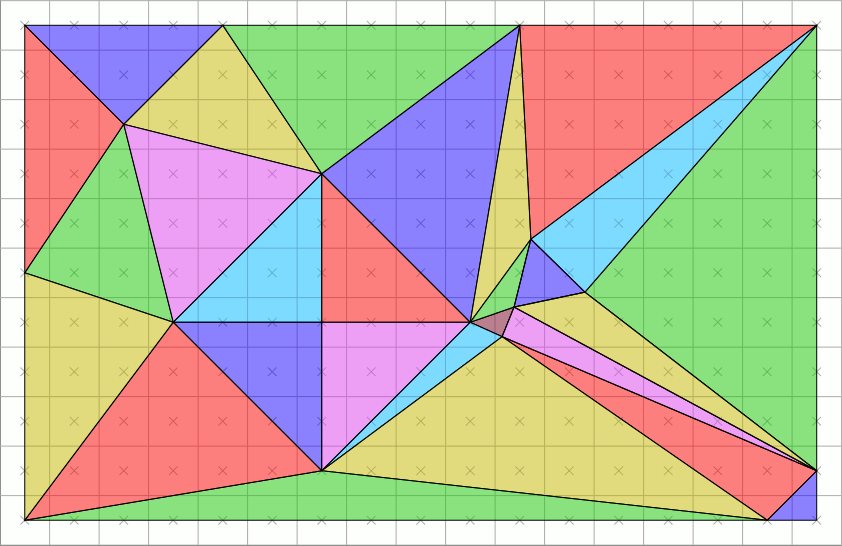
The distinction between a fragment and a pixel matters. Several triangles can overlap the same pixel, so a single pixel may receive many fragments in one frame, and only some of them will contribute to the final image.
Because the test is done at discrete sample points, edges that fall between samples produce the stair-step effect known as aliasing. Anti-aliasing techniques exist to soften it; multisample anti-aliasing, for example, tests coverage at several points per pixel during this stage.
Attribute interpolation also has to account for perspective. Linear interpolation in screen space would warp textures on surfaces angled away from the camera, which is exactly the wobbly texture effect visible in some early 3D consoles that lacked perspective-correct mapping. Modern hardware corrects for this automatically.
Step 6: Pixel (fragment) shading
The pixel shader (called a fragment shader in OpenGL and Vulkan terminology) runs for each fragment and decides its color. This is usually where most of the visual work happens:
- Sampling textures such as base color, normal maps and roughness maps.
- Computing lighting from the material properties, light directions and shadow information.
- Applying effects like fog, emissive glow or transparency.
Pixel shading is often the most expensive part of rendering, which is why resolution has such a big effect on performance: double the pixel count and you roughly double the pixel shader work. Many engines use a deferred approach that first writes surface properties (color, normal, roughness and so on) into a set of buffers called a G-buffer, then computes lighting in a separate pass. This avoids lighting fragments that end up hidden, at the cost of extra memory bandwidth.
Step 7: Depth testing and the output merger
The final stage decides whether a fragment actually makes it into the image. The key tool is the depth buffer (also called the Z-buffer), an image that stores, for every pixel, the distance to the closest surface drawn so far.
When a new fragment arrives, its depth is compared with the stored value. If it is closer, it wins: its color is written and the depth buffer is updated. If it is farther, it is discarded. This simple test is what makes walls hide things behind them, regardless of the order objects were drawn in. Many GPUs perform this test before running the pixel shader where possible, called early depth testing, so hidden fragments never pay for expensive shading. Some engines also draw a cheap depth pre-pass first to maximize that benefit.
The output merger also handles:
- Stencil testing: a per-pixel mask used for effects like portals, outlines or decals.
- Blending: combining the fragment’s color with what is already there, needed for glass, smoke and other transparent materials. Transparent objects are typically drawn after opaque ones, sorted back to front, because blending depends on order.
The result is written to a render target. Eventually, after post-processing such as tone mapping, bloom and anti-aliasing, the finished image ends up in the frame buffer, the block of memory holding the picture that will be sent to the display. Games use at least two buffers so one can be displayed while the next frame is being drawn, then swap them.
Why rasterization has dominated real-time graphics
Rasterization has stayed on top for practical reasons:
- It maps beautifully to parallel hardware. Every vertex and every fragment can be processed independently, which is exactly what GPUs with thousands of cores are good at.
- Memory access is coherent. Neighboring pixels in a triangle use neighboring texture data, so caches work efficiently.
- Cost scales predictably with the number of triangles and pixels, which makes performance easy to budget.
- Decades of tooling and tricks have built up around it: shadow maps, screen-space effects, baked lighting and more.
Its limitation is that it only answers “what is visible from the camera?” Effects that need information about the rest of the scene, such as accurate reflections, soft shadows and bounced light, have to be approximated. That is the gap ray tracing fills. Modern games increasingly combine the two: rasterization finds the visible surfaces quickly, and rays are traced from those surfaces to compute lighting. If you want the other half of that story, our explainer on what ray tracing is in games picks up where this one ends.
A quick recap
For one object in one frame, the pipeline looks like this:
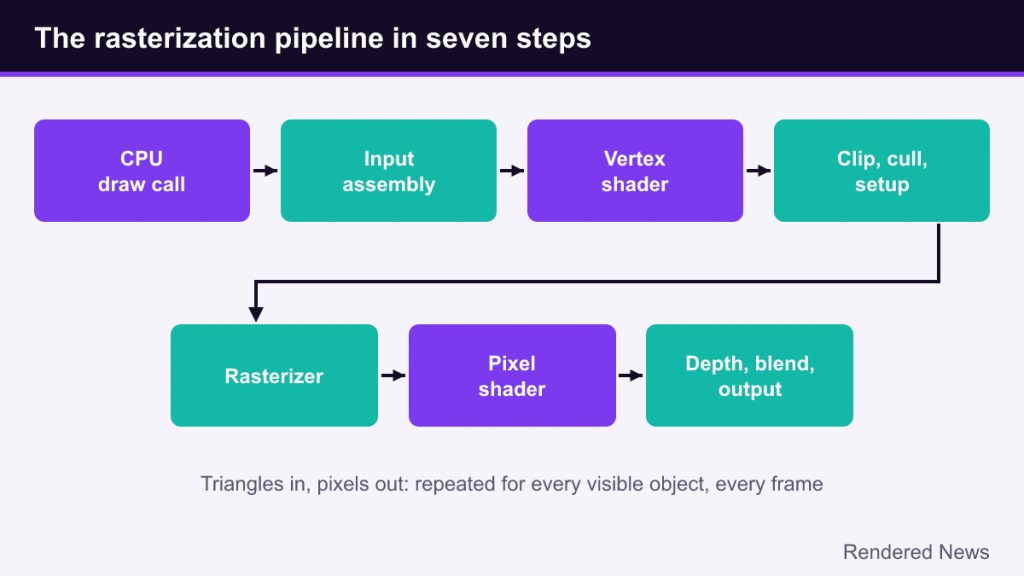
- The CPU issues a draw call with the mesh, shaders and textures.
- The input assembler reads vertices and builds triangles.
- The vertex shader transforms each vertex into clip space.
- Clipping, culling and setup discard and prepare triangles.
- The rasterizer finds covered pixels and produces fragments.
- The pixel shader colors each fragment using textures and lighting.
- Depth, stencil and blending decide what is written to the render target.
Repeat that for every visible object, add post-processing, and do it all again in a few milliseconds. Every graphics setting you adjust, from shadow resolution to render scale, changes the work done at one or more of these steps.