Lumen Explained: Unreal Engine 5’s Dynamic Global Illumination
How Lumen lights Unreal Engine 5 games in real time: bounce light, screen traces, the surface cache, software vs hardware ray tracing and common artifacts.
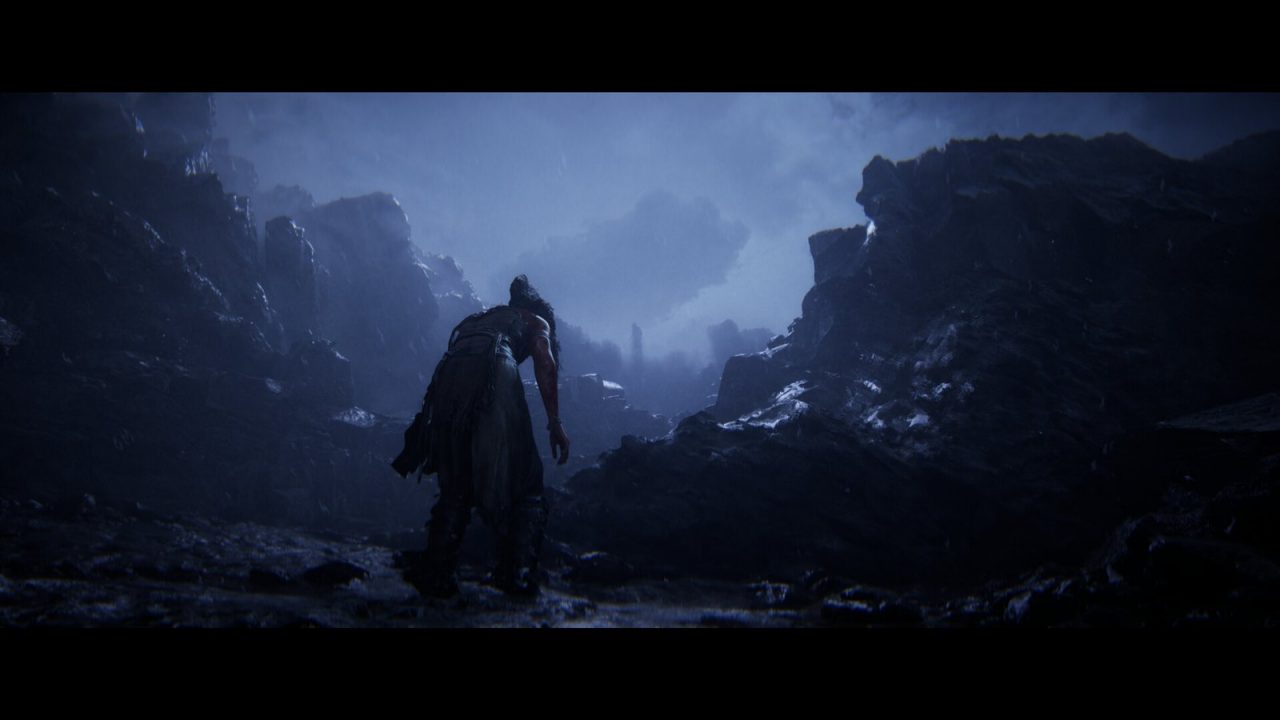
Light in the real world does not stop when it hits a surface. Sunlight streaming through a window bounces off the floor, tints the walls with the floor’s color and softly lights the corners of the room the sun never reaches directly. That bounced light, called indirect lighting or global illumination (GI), is one of the biggest differences between a scene that looks “rendered” and one that looks real.
For most of game history, convincing global illumination had to be precomputed. Unreal Engine 5’s Lumen was designed to calculate it in real time, so lighting reacts instantly when anything in the world changes. This article explains what Lumen does, how its layered tracing system works, why it can run with or without ray tracing hardware, and where its typical artifacts come from.
What Lumen does
Lumen is Unreal Engine 5’s default system for two things:
- Dynamic diffuse global illumination: light bouncing between surfaces, including color bleeding (a red carpet tinting nearby walls) and soft indirect shadowing in corners and under objects.
- Reflections: glossy and mirror-like reflections that match the same lighting, including reflections of things outside the camera’s view.
“Dynamic” is the key word. With Lumen, if the sun moves, a door opens, a light is switched off or a wall is destroyed, the indirect lighting updates within a short time. Emissive materials, like glowing screens or neon signs, can also contribute light to the scene.
Why games used to bake their lighting
Before real-time systems like Lumen, most high-quality game lighting relied on lightmaps. Developers ran a lighting build (sometimes for hours) that simulated how light bounces through a level, then stored the result in textures applied to static surfaces. Light probes captured approximate lighting at points in space for moving objects.

Baked lighting can look excellent and is cheap at runtime, but it has major drawbacks:
- It is static. A time-of-day cycle, destructible walls or player-built structures break it.
- Every lighting change requires a rebuild, slowing iteration for artists.
- Lightmaps need careful UV layouts and memory for every lit surface, which is hard for large open worlds.
Lumen’s promise is to remove most of this. Artists place lights and see the final indirect lighting immediately in the editor, and the same lighting works at runtime for anything that moves.
How Lumen traces light
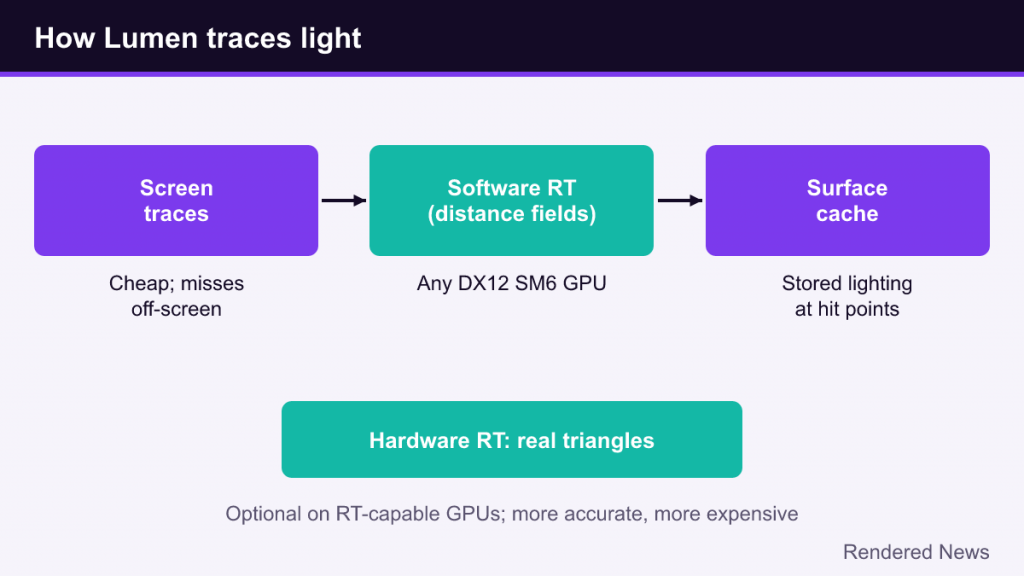
Global illumination fundamentally means tracing rays: from a point on a surface, look out in many directions and find what light arrives. Our ray tracing explainer covers the basic idea. Tracing rays against full-detail scene geometry for every pixel is too expensive, so Lumen uses a layered approach that tries cheap methods first and falls back to more robust ones.
Screen traces
Lumen first traces rays against what is already on screen, using the depth buffer. This is cheap and captures fine detail exactly as rendered, and it smooths over mismatches between Lumen’s simplified scene and the real triangles. Its weakness is the classic screen-space problem: anything off-screen or hidden behind another object simply isn’t there to hit.
Software ray tracing
When screen traces fail, Lumen continues the ray against a simplified version of the scene. In software mode it uses signed distance fields: volume textures that store, for each point, the distance to the nearest surface. Rays can step through distance fields very quickly. According to Epic’s documentation, Lumen traces against detailed per-mesh distance fields for the first couple of meters of each ray, then against a coarser merged global distance field for the rest. This mode runs on any GPU that supports DirectX 12 with Shader Model 6 (or the console equivalents), with no ray tracing hardware required.
Hardware ray tracing
On GPUs with ray tracing support, Lumen can instead trace against actual triangle geometry using hardware ray tracing. This is more accurate, supports skinned (animated) meshes better, and allows higher-quality reflections, including an option to evaluate full lighting at the hit point rather than reading it from a cache. It costs more, especially in dense scenes. If a mesh uses Nanite, hardware ray tracing uses Nanite’s lower-detail fallback mesh by default, as explained in our Nanite guide.
The surface cache: where lighting is stored
When a ray hits something, Lumen needs to know what light that surface is reflecting. Calculating full material and lighting at every hit would be expensive, so Lumen maintains a surface cache.
The surface cache captures each mesh from several directions using simplified “cards,” a bit like taking photographs of an object from multiple sides. These captures store material properties such as color and normals, and Lumen keeps lighting information for them updated over time. A ray hitting a surface can then read cached lighting cheaply. Because light that has been cached can bounce again on later frames, Lumen achieves multiple bounces over time without tracing each bounce explicitly.
This design explains some of Lumen’s quirks. Areas of a mesh not covered by any card can’t be lit properly in the cache, and Epic’s tools show these gaps in a visualization mode. Complex shapes with interior spaces or deforming characters are harder to cover well.
Final gather
The last step, called the final gather, gathers the incoming light for each pixel the camera sees. Because only a limited number of rays can be traced per frame, Lumen reuses results across nearby pixels and over several frames, then filters them to remove noise. This temporal accumulation is why indirect lighting may take a moment to catch up after a sudden change.
Common Lumen artifacts and why they happen
Noise and splotches
With limited rays per pixel, indirect lighting is inherently noisy, especially in dim interiors lit mostly by bounce light. Lumen’s filtering hides most of it, but you may see blotchy patches or a “boiling” shimmer in dark corners and in reflections, particularly at lower quality settings.
Light leaking
In software ray tracing mode, thin walls can let light leak through, because the distance field representation may not resolve them. Epic’s guidance is to build walls at least 10 cm thick. Caves and enclosed spaces are also prone to leaking when the scene representation is too coarse.
Lag and ghosting
Because results accumulate over frames, fast lighting changes (a flashlight switched on, a door slammed open) can show a short delay before indirect light settles. Fast-moving objects may leave faint trails in indirect lighting or reflections.
Distance limits
By default, Lumen’s detailed scene covers an area around the camera (Epic’s docs give 200 meters as the default), with longer-range options available. Beyond that, lighting is approximated, which can cause indirect lighting to pop in when the camera moves very quickly across large worlds.
Performance, quality settings and Lumen Lite
Lumen is one of the most expensive parts of a modern Unreal Engine 5 frame. Epic’s documentation describes two main targets: 60 frames per second for large open worlds at the engine’s High scalability level, and 30 frames per second for cleaner, higher-quality indoor lighting at the Epic level. Those targets assume a reduced internal resolution upscaled to the output resolution, which is one reason UE5 games rely heavily on temporal upscaling.
In PC games, Lumen-related quality shows up under settings such as Global Illumination, Reflections, or a general Lighting quality option. Lowering them typically reduces the number of rays, the resolution of the lighting calculation and the quality of the scene representation, which increases noise and lag. Some games also offer a toggle between software and hardware ray tracing modes, or let players disable Lumen in favor of a cheaper fallback such as screen-space GI.
Unreal Engine 5.8, released in June 2026, added Lumen Lite, a performance-focused global illumination option. Epic says it can run up to twice as fast as the High Quality Lumen preset while keeping much of Lumen’s look, and positions it as efficient enough for Nintendo Switch 2 at 60 fps. As with any vendor claim, real-world gains will depend on the project.
Lumen’s requirements and limits
According to Epic’s documentation, as of 2026 Lumen targets PlayStation 5, Xbox Series X|S, Nintendo Switch 2 and capable PCs. Software tracing needs DirectX 12 with Shader Model 6 support; hardware tracing requires a GPU with ray tracing support on DirectX 12 or Vulkan. Lumen does not support previous-generation consoles or VR, and it is incompatible with forward shading. Projects targeting those platforms use other lighting methods, often baked lightmaps.
Lumen also works best with content built for it: modular geometry, sensibly thick walls and meshes that the surface cache can represent well. Large single meshes that combine an entire building, or extremely thin one-sided surfaces, tend to cause trouble.
Lumen compared with other GI approaches
| Approach | Dynamic? | Typical trade-off |
|---|---|---|
| Baked lightmaps | No (static scenes) | Very cheap at runtime and high quality, but slow to build and inflexible |
| Screen-space GI | Yes | Cheap, but misses anything off-screen |
| Lumen (software) | Yes | Works without RT hardware; can leak light and lose fine detail |
| Lumen (hardware) | Yes | More accurate and better reflections; higher GPU cost |
| Path tracing | Yes | Most physically complete; extremely expensive in real time |
Lumen sits in the middle: far more flexible than baking, more complete than pure screen-space methods, and much cheaper than full path tracing.
Why Lumen changed workflows
Lumen’s biggest impact may be on how games are made rather than how they look. Artists can light scenes interactively without waiting on lighting builds, designers can add time-of-day cycles and destruction without breaking the lighting, and large worlds avoid gigabytes of lightmap data. Together with Nanite, it is a central part of what our Unreal Engine 5 overview describes as UE5’s identity. The price is GPU cost and some characteristic artifacts, which is why understanding Lumen’s settings helps both developers tuning a game and players adjusting their graphics menus.