Unreal Engine 5 Explained: Features, Tools and Who Uses It
A clear tour of Unreal Engine 5: Nanite, Lumen, World Partition, MetaHuman, PCG, Blueprints and C++, Fab, the version history and the games built on it.
Unreal Engine 5 is the engine people mean when they talk about “next-gen graphics.” Its tech demos made headlines, and it now runs everything from big-budget action games to small indie projects, film sets and car configurators. The marketing names, though (Nanite, Lumen, World Partition, MetaHuman, PCG, Substrate), can make UE5 sound like a list of buzzwords and not a set of tools.
This guide explains what each major part of Unreal Engine 5 actually does, how the engine has changed from its 2020 reveal to the current 5.x releases, how developers work in it day to day, and which games use it. If you are new to the idea of an engine, start with our explainer on what a game engine is, then come back here.
From reveal to release: a short UE5 timeline
Epic Games revealed Unreal Engine 5 on May 13, 2020, with a real-time demo called “Lumen in the Land of Nanite” running on PlayStation 5 hardware. It introduced the two technologies that still define UE5’s identity.
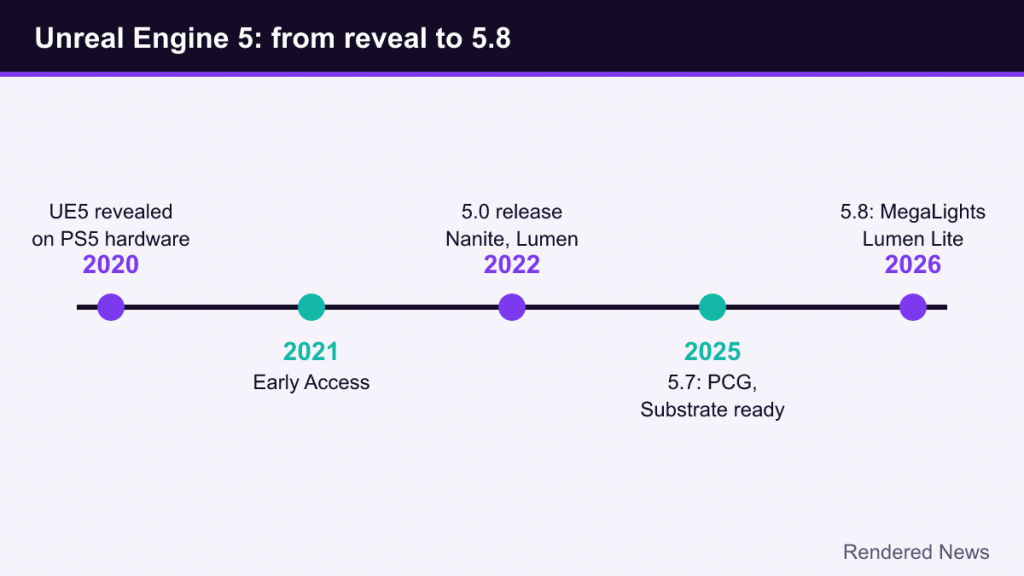
An Early Access build followed on May 26, 2021, and the full release, Unreal Engine 5.0, launched for developers on April 5, 2022. Since then Epic has shipped roughly two numbered updates per year:
- 5.0 (April 2022): production launch with Nanite, Lumen, World Partition and the redesigned editor.
- 5.1 to 5.3 (2022–2023): broader Nanite support, the first experimental Procedural Content Generation (PCG) framework, and continued work on Lumen performance.
- 5.4 to 5.6 (2024–2025): big animation and rigging upgrades, MegaLights introduced as an experimental many-lights system, and performance work aimed at hitting 60 fps on consoles.
- 5.7 (November 2025): PCG and the Substrate material system declared production-ready, with Nanite Foliage and a Procedural Vegetation Editor added as experimental features.
- 5.8 (June 17, 2026): announced at the State of Unreal 2026 event, with MegaLights moved to production-ready, a lighter “Lumen Lite” global illumination option, and an experimental mesh-based terrain system.
As of October 2026, 5.8 is the current release, and coverage of its launch describes it as likely the last major 5.x version before the move to Unreal Engine 6, whose first previews have been loosely indicated for around late 2027. Treat that last date as an intention, not a promise.
Nanite: geometry without manual LODs
Traditionally, every 3D model in a game needs several hand-made or auto-generated “levels of detail” (LODs), so distant objects can be drawn with fewer triangles. Artists also have to bake fine detail from high-poly sculpts into normal maps, because the GPU cannot afford the original geometry.
Nanite is UE5’s virtualized geometry system. Meshes are broken into small clusters of triangles organized in a hierarchy, and each frame the engine picks just enough clusters to draw detail at roughly pixel scale for the current view. Clusters stream in and out of memory as needed, and very small triangles are rasterized by a custom compute-based path rather than the GPU’s fixed-function hardware, which handles tiny triangles poorly. If you want the background on why that matters, our guide to how rasterization works covers the classic pipeline Nanite partly bypasses.
In practice Nanite lets teams import very dense assets, such as photogrammetry scans or sculpts, with far less manual optimization. It has limits, especially around deforming meshes, some transparent materials and foliage. Epic has narrowed those gaps over time, adding support for tessellation and displacement and, in 5.7, an experimental Nanite Foliage path.
Lumen and MegaLights: dynamic lighting
Lumen is UE5’s default system for dynamic global illumination and reflections, meaning light that bounces off surfaces and colors the world around them. Before Lumen, most games got realistic bounce lighting by “baking” it into lightmaps offline, which looked good but froze lighting in place. Move a wall or change the time of day and the baked result was wrong.
Lumen calculates indirect lighting at runtime. It combines several tracing methods, including screen-space traces, a simplified “surface cache” of the scene, and either software ray tracing against signed distance fields or hardware ray tracing on GPUs that support it. Our ray tracing explainer covers the basic idea of tracing rays through a scene. The result is lighting that responds instantly when a door opens, the sun moves or a level gets destroyed, and it cuts out lengthy light-baking steps for artists.
The trade-off is cost. Lumen is expensive, and many UE5 games offer lower-quality modes or fall back to cheaper techniques on weaker hardware. The Lumen Lite option in 5.8 targets that problem with a simplified, cheaper global illumination path.
MegaLights tackles a different issue: scenes with very many dynamic, shadow-casting lights. Traditionally each shadowed light adds real cost, so designers ration them carefully. MegaLights uses stochastic sampling and denoising to let scenes contain far more lights with a much flatter performance curve. It arrived as experimental in 5.5 and became production-ready in 5.8.
World building: World Partition, PCG and terrain
World Partition
Open worlds can’t be loaded into memory all at once. World Partition splits a large map into a grid of cells that stream in and out automatically based on where the player (or the editor camera) is. It replaced UE4’s World Composition approach. It also changes how teams collaborate: with the “One File Per Actor” system, individual objects are saved as separate files, so many people can edit the same map without fighting over a single huge level file in version control.
Procedural Content Generation (PCG)
PCG is a node-based framework for generating content by rules, for example “scatter rocks on slopes steeper than X, put trees near rivers, keep paths clear.” It works in the editor and at runtime, and newer versions can run parts of the graph on the GPU. PCG became production-ready in 5.7, and Epic continued expanding it in 5.8. It lets artists describe placement rules once, apply them across huge areas, then tweak by hand.
Characters, animation and materials
MetaHuman
MetaHuman is Epic’s framework for creating realistic digital humans. It grew out of technology from companies Epic acquired, including 3Lateral, Cubic Motion and Quixel. Creators can sculpt and blend faces from a large library, generate fully rigged characters, and use MetaHuman Animator to turn video performances into facial animation. Recent versions have pulled more of this workflow directly into the engine, with 5.8 adding single-camera facial capture and experimental crowd tools.
Animation and rigging
UE5 has pushed hard to let animators work inside the engine instead of round-tripping to external tools. Control Rig provides in-engine rigging, animation retargeting moves motions between differently proportioned skeletons, and Motion Matching (introduced in 5.4) chooses animation poses from a large database at runtime for more natural movement. Chaos, Epic’s in-house physics system, handles rigid bodies, cloth, destruction and, increasingly, hair and flesh simulation.
Substrate
Substrate is UE5’s newer material system. Traditional Unreal materials use a fixed set of shading models (default lit, clear coat, subsurface and so on). Substrate instead treats a material as layers and slabs that can be stacked and blended, which makes things like dust on lacquered paint or wet skin easier to express accurately. It became production-ready in 5.7.
How developers actually work in UE5
Blueprints and C++
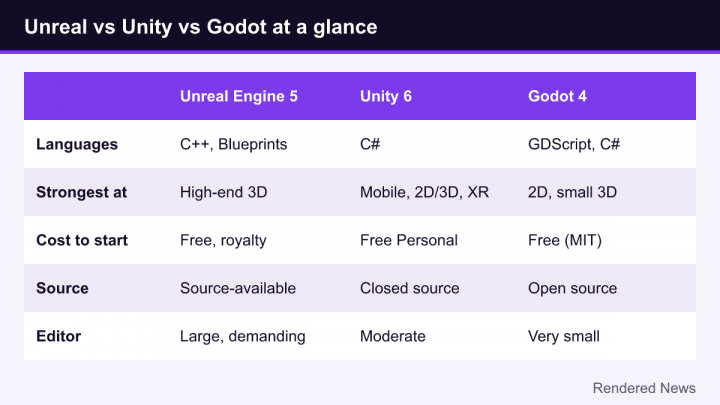
Unreal offers two main ways to write game logic. Blueprints are a visual scripting system: you connect nodes with wires instead of typing code. They are quick for prototyping, level scripting and designer-facing logic. C++ is the engine’s native language, used for core systems, performance-critical code and anything that needs deep access to the engine. Most professional projects use both, with programmers exposing C++ building blocks that designers then assemble in Blueprints.
Unreal Editor for Fortnite (UEFN) uses a separate language called Verse, but that is a distinct toolset for making Fortnite islands rather than standalone games.
The editor and source access
The UE5 editor is a single application for building levels, editing materials, animating, setting up audio and packaging builds for each platform. Epic also makes the full engine source code available on GitHub to registered users, which is rare among commercial engines. Studios can fix bugs or add features themselves, and many large teams run their own modified version of the engine.
Fab and Quixel Megascans
On October 22, 2024, Epic launched Fab, a unified content marketplace that replaced the Unreal Engine Marketplace and the Sketchfab Store and became the home of Quixel Megascans. Fab sells and distributes models, materials, plugins and other assets for Unreal and other tools, so small teams can buy or download ready-made assets rather than build everything themselves.
Licensing in brief
Unreal Engine is free to download and use. For games, Epic’s standard terms (as of 2026) charge a 5% royalty on gross revenue only after a product earns its first $1 million, and revenue from sales through the Epic Games Store is excluded. Epic has also offered a reduced royalty rate for games that release on the Epic Games Store alongside other stores. For non-game uses such as film or enterprise work, Epic introduced seat-based licensing in 2024 for larger companies. License terms change, so always check Epic’s official licensing page before you rely on any figure.
Games and projects built with Unreal Engine 5
UE5 is used by studios of every size. Some well-known examples:
- Fortnite, Epic’s own game, moved to UE5 in late 2022 and often serves as a test bed for new engine features.
- Senua’s Saga: Hellblade II (Ninja Theory, 2024), known for its MetaHuman-style facial performances and dense environments.
- Black Myth: Wukong (Game Science, 2024), a showcase for Nanite-heavy environments and hardware ray tracing options on PC.
- Clair Obscur: Expedition 33 (Sandfall Interactive, 2025), a debut title from a small studio that became one of 2025’s most celebrated games.
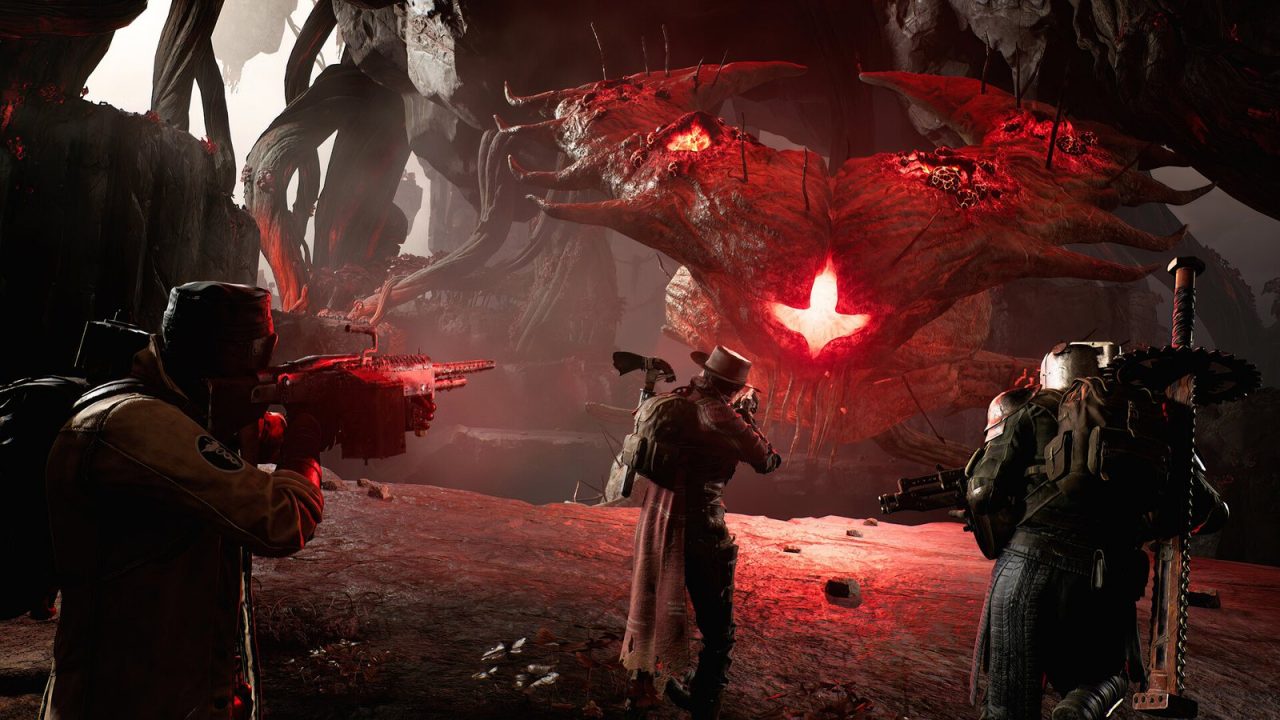
- Remnant II, Immortals of Aveum, Avowed and ARC Raiders, showing the range of genres and team sizes.
Several studios have also announced moves from in-house engines to UE5. CD Projekt Red, for instance, is developing its next Witcher game in Unreal Engine 5 rather than its own REDengine.
Common misconceptions about UE5
- “UE5 games all look the same.” Default settings and shared asset libraries can create a familiar look, but the engine supports stylized rendering too, and Substrate’s non-photorealistic shading work in 5.8 points further in that direction. Art direction, not the engine, determines style.
- “UE5 games stutter because of the engine.” Stutter in some PC releases has often come from shader compilation and asset streaming during traversal. Epic has added tools to reduce both, but the final result depends heavily on how each project uses them.
- “Nanite and Lumen are required.” They are defaults, not mandates. Many UE5 games, especially those targeting lower-end hardware or mobile, disable one or both and use traditional LODs and baked lighting.
Is Unreal Engine 5 the right choice?
UE5 is strongest when a project needs high-end 3D visuals, large worlds, realistic characters or cinematic presentation, and when the team can handle a large, complex tool. It is less of a natural fit for simple 2D games, very small mobile titles, or developers who want a lightweight editor that starts in seconds. Learning it is a long-term investment, but Epic’s free documentation and courses, plus the engine’s huge share of the industry, make that investment easier to justify than ever.
What Unreal Engine 5 has done is make advanced techniques like virtualized geometry and fully dynamic global illumination something an ordinary project can switch on, not something only a handful of studios could build.