Unreal vs Unity vs Godot: Which Engine Should You Learn First?
A goals-based comparison of Unreal, Unity and Godot as of 2026: languages, learning curve, 2D vs 3D, licensing, platforms and which to learn first.
“Which engine should I learn?” is the first question almost every aspiring game developer asks, and the internet’s answers are often tribal. The honest answer is that Unreal Engine, Unity and Godot are all capable of shipping excellent games, and each has a clear profile of strengths. What matters is matching an engine to what you want to make and how you like to learn.
This comparison looks at the three engines side by side as of 2026: programming languages, learning curve, 2D and 3D strengths, licensing, platforms, community and career relevance. It ends with goal-based recommendations. For deeper dives on each engine, see our explainers on Unreal Engine 5, Unity and Godot.
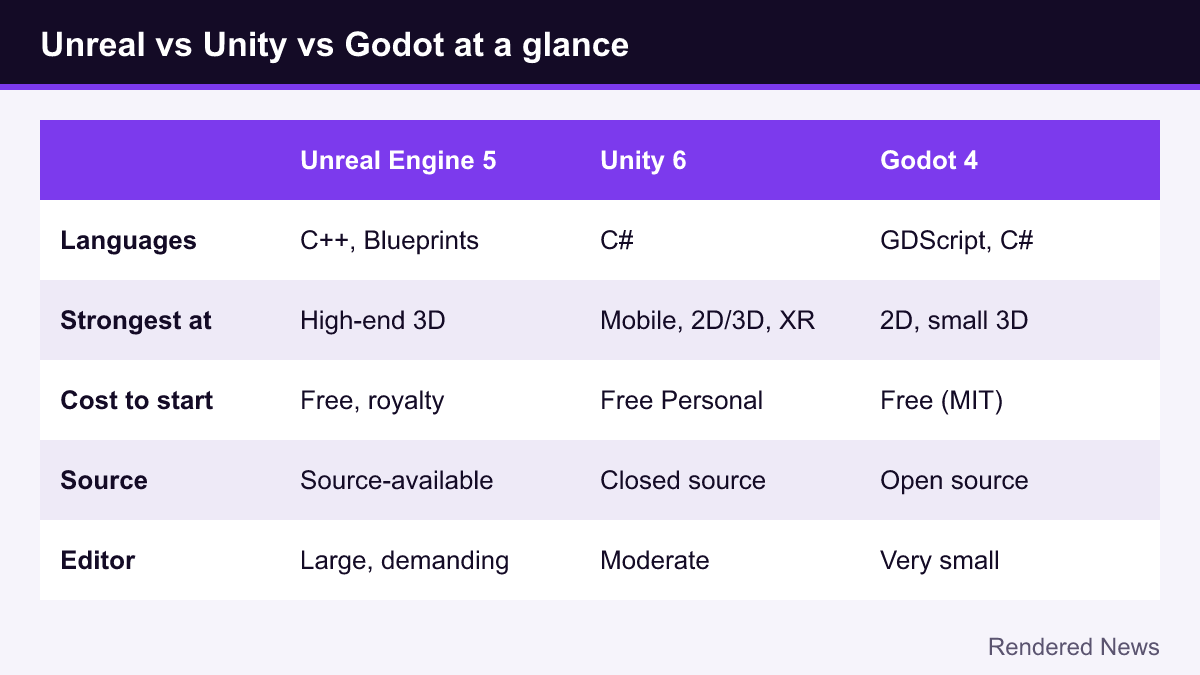
The three engines at a glance
| Unreal Engine 5 | Unity 6 | Godot 4 | |
|---|---|---|---|
| Owner / model | Epic Games; source-available commercial engine | Unity Technologies; closed-source commercial engine | Community project supported by the nonprofit Godot Foundation; open source |
| Main languages | C++ and Blueprints visual scripting | C# | GDScript, C#, plus C/C++ via GDExtension |
| Strongest at | High-end 3D, large worlds, realistic lighting and characters | Mobile, 2D and 3D, VR/AR, broad platform reach | 2D, small to mid-size 3D, lightweight workflow |
| Cost to start | Free; royalty after a revenue threshold | Free Personal plan up to a revenue/funding limit; paid plans above | Free under the MIT license, no royalties |
| Editor footprint | Large install, demanding hardware | Moderate | Very small, runs on modest machines |
Programming languages and scripting
Unreal uses C++ for engine-level and performance-critical code, and Blueprints for visual scripting. Blueprints are a genuine strength for beginners and designers: you can build a complete small game without typing code. But to go deep in Unreal, especially in professional roles, you will eventually need C++, which is a demanding language with manual memory concerns and long compile times in big projects.
Unity uses C#, a modern, widely taught language that is easier to pick up than C++ and useful outside games. Most Unity tutorials and courses assume C#, and almost all gameplay code in Unity projects is written in it. Unity also has visual scripting, but it plays a smaller role than Blueprints do in Unreal.
Godot centers on GDScript, a Python-like language built for the engine. It is quick to learn, very concise and tightly integrated with the editor. Godot also offers C# (via a separate .NET build) and native extensions in C and C++. The trade-off is that GDScript knowledge is specific to Godot, while C# and C++ skills transfer to other engines and software jobs.
Learning curve
All three are learnable, but the early experience differs.

- Godot usually gets beginners to “something moving on screen” fastest. The editor is small, the scene-and-node model is consistent, and the official documentation includes step-by-step first-game tutorials for both 2D and 3D.
- Unity sits in the middle. The basics (GameObjects, components, a C# script) are straightforward, and Unity Learn offers free structured pathways. The harder parts come later: choosing render pipelines, navigating many packages and deciding between several overlapping systems.
- Unreal has the steepest start. The editor is vast, the hardware demands are high and the engine has its own framework of concepts (Actors, Pawns, Game Modes, Controllers) that you must understand. However, Blueprints and Epic’s templates let you build impressive 3D scenes quickly, and Epic offers a large catalog of free courses on its developer community site.
A common mistake is treating the learning curve as the only factor. A slightly harder engine that fits your goal will serve you better than an easy one you later have to abandon.
2D versus 3D strengths
2D
Godot and Unity are both strong choices for 2D. Godot has a dedicated 2D engine working in pixel coordinates, with tilemaps, 2D lighting and physics built in. Unity has mature 2D tooling (sprites, tilemaps, 2D animation and lighting in URP) and a huge library of 2D tutorials. Unreal can make 2D games through its Paper2D tools and community plugins, but 2D is not its focus, and most beginners will find it heavier than necessary.
3D
For realistic 3D, Unreal leads clearly. Nanite virtualized geometry, Lumen global illumination, MegaLights, MetaHuman and world-building tools like World Partition and PCG give it the most advanced out-of-the-box rendering of the three. Unity can produce high-quality 3D too, but as of its 2026 render pipeline strategy Unity is focusing new features on URP, with HDRP in maintenance. Godot’s Forward+ renderer handles stylized and mid-range 3D well, with features such as SDFGI global illumination and volumetric fog, but it does not try to match Unreal’s top-end feature set.
Licensing and fees (as of 2026)
Licensing should be part of every engine decision. Always confirm current terms on the official pages, since they change.
- Unreal Engine: free to use. For games, Epic charges a 5% royalty on gross revenue after the first $1 million per product, with revenue from sales on the Epic Games Store excluded. The engine source code is available to registered users, but it is not open source; you are bound by Epic’s EULA.
- Unity: subscription-based. The free Unity Personal plan applies below a revenue-and-funding limit of $200,000 (raised from $100,000 with Unity 6); above that, paid plans such as Unity Pro are required. In September 2024 Unity canceled its controversial per-install Runtime Fee for games, and the Made with Unity splash screen became optional for Personal projects built in Unity 6.
- Godot: MIT-licensed open source. No fees, no royalties, no revenue reporting. You only need to include the license notice. You can also modify the engine freely.
For a hobbyist, none of these costs matter at first. They matter for long-term planning: some developers value Godot precisely because no company can change its terms for existing code, a concern sharpened by Unity’s 2023 pricing controversy.
Platforms
All three export to Windows, macOS and Linux, plus Android and iOS. The differences show up at the edges:
- Consoles: Unreal and Unity both support current PlayStation, Xbox and Nintendo platforms once you are an approved console developer. Godot cannot ship console export templates in its open-source code because console SDKs are confidential, so console releases typically go through third-party porting companies.
- Web: Unity and Godot both export to the web; in Godot the Compatibility renderer is used for web builds. Unreal no longer treats the browser as a mainstream target.
- Mobile: Unity has the deepest mobile track record and tooling. Unreal can target mobile but is heavier. Godot’s Mobile and Compatibility renderers suit lighter mobile games.
- VR/AR: Unity has long been the most common choice for standalone VR, Unreal is used for high-end PC VR, and Godot has growing OpenXR support.
Community, documentation and assets
Unity and Unreal both have enormous user bases, years of tutorials, active forums and big asset marketplaces: the Unity Asset Store, and Epic’s Fab, which absorbed the Unreal Marketplace and Quixel Megascans in 2024. Godot’s community is smaller but growing fast, with clear official documentation, an asset library for free plugins and a strongly volunteer-driven culture.
One practical tip for all three: check the version of any tutorial. Unreal 4 vs 5, Unity’s Built-in pipeline vs URP, and Godot 3 vs 4 differ enough to confuse beginners who mix sources.
Careers and the job market
If your goal is a job in the industry, look at listings in your region and target field rather than generalizations. Broadly, Unreal and C++ appear frequently in roles at larger studios working on high-end 3D, and Unreal is also used heavily in film, TV and visualization. Unity and C# appear frequently in mobile, VR and many indie or mid-sized studios. Godot experience is less often requested by name, but the fundamentals you learn in it (game loops, physics, state machines, UI, optimization) transfer to any engine. Studios hiring juniors usually care more about finished projects you can show than about which engine you used.
Which engine should you learn first?
You want to make small 2D games as a hobby
Start with Godot. It is free, fast and excellent at 2D, and GDScript lets you focus on game logic instead of language complexity. Unity is an equally valid alternative if you prefer C#.
You want realistic 3D, cinematic scenes or large worlds
Choose Unreal Engine 5. Start with Blueprints and Epic’s templates, then add C++ when you hit their limits. Make sure your computer can comfortably run the editor.
You want to make mobile games or VR
Unity is the most established path, with the largest body of mobile and XR tutorials, plugins and shipped examples.
You want an industry job at a large studio
Lean toward Unreal and C++ for AAA-style 3D roles, or Unity and C# for mobile and many mid-sized studios, and research local listings. Whatever you choose, ship small complete projects to show.
You are not sure yet
Pick the engine whose first tutorial you can finish this week. Many developers try two engines with the same tiny project, such as a simple platformer or Pong clone, and keep the one that feels better.
Common mistakes when choosing
- Switching engines repeatedly. Engine-hopping feels productive but delays the real skills: finishing, polishing and debugging games.
- Choosing for graphics you will not use. A small team making a pixel-art game gains little from Nanite and Lumen.
- Ignoring hardware. Unreal on a low-spec laptop can be a frustrating experience; Godot runs almost anywhere.
- Assuming the choice is permanent. Core concepts transfer. Many professionals have worked in all three.
Every engine here has produced successful games. Choose the one that matches your next project, commit to finishing that project, and let real experience guide the next decision.