DLSS vs FSR vs XeSS: How the Three Upscalers Differ Under the Hood
A technical comparison of DLSS, FSR and XeSS as of 2026: ML vs hand-tuned reconstruction, hardware needs, open vs closed SDKs, shared inputs and DirectSR.

Open the graphics menu of almost any big PC release and you will find at least two of three names: NVIDIA DLSS, AMD FSR and Intel XeSS. All three render the game at a lower resolution and reconstruct a sharper image, and all three now come bundled with frame generation and latency features. But underneath, they were built on different philosophies, have different hardware requirements and are distributed in different ways.
This article compares how the three upscalers work technically as of 2026. It deliberately avoids benchmark numbers and graphics card recommendations, and focuses on the design choices that explain why each behaves the way it does. For the full story of each, see our individual explainers on DLSS, FSR and XeSS.
What all three have in common
Modern versions of all three are temporal upscalers. The core idea is shared:
- The game renders each frame at a reduced internal resolution, shifting the camera by a tiny sub-pixel amount every frame (called jitter), so that successive frames sample slightly different points.
- Motion vectors tell the upscaler how each pixel moved between frames.
- The upscaler reprojects its accumulated history into the new frame and blends in the new samples, building up more detail than any single low-resolution frame contains.
- It has to decide, per pixel, how much history to trust. When an object moves, appears from behind something, or changes lighting, old samples become wrong, and keeping them causes ghosting; discarding them too eagerly causes shimmering and loss of detail.
That last step, deciding how to combine and reject history, is where the three technologies have differed most, and where the switch to machine learning has made the biggest difference.
Machine learning vs hand-tuned heuristics
Hand-tuned temporal upscaling
A hand-tuned (or “analytical”) upscaler uses rules written by engineers: compare the history color with the range of colors in the current pixel’s neighborhood, clamp or reject history that falls outside it, sharpen edges, and so on. FSR 2 and FSR 3’s upscaler worked this way, as do engine-built upscalers like Unreal’s Temporal Super Resolution. The advantage is that the algorithm runs on ordinary shader cores and works on almost any modern GPU. The disadvantage is that fixed rules struggle with difficult cases: fine foliage, thin wires, particles, transparency and newly revealed areas.
ML-based upscaling
An ML-based upscaler replaces most of those rules with a neural network trained on many examples of low-resolution inputs paired with very high-quality reference images. The network learns how to weigh history and new samples in situations where simple rules fail. The cost is computation: running a network for every pixel every frame requires a lot of math, which is why ML upscalers lean on dedicated matrix hardware.
As of 2026, all three vendors have ML-based upscalers:
- DLSS has been ML-based since its first version. DLSS 4 (January 2025) moved from convolutional neural networks to a transformer model, and DLSS 4.5 (January 2026) introduced a second-generation transformer for Super Resolution.
- XeSS has been ML-based since launch in 2022, with a full path using Intel’s XMX matrix engines and a lighter DP4a path for other GPUs.
- FSR switched to ML with FSR 4, designed around the AI acceleration in AMD’s RDNA 4 GPUs. Since the Redstone launch in December 2025, AMD’s developer documentation calls it “FSR Upscaling.” AMD keeps analytical fallback paths for hardware that can’t run the ML model.
Hardware requirements
The ML shift makes hardware support the clearest technical difference between the three:
| DLSS | FSR | XeSS | |
|---|---|---|---|
| Where the ML model runs | NVIDIA Tensor Cores (RTX GPUs only) | AI acceleration on supported Radeon GPUs (RDNA 4, with an INT8 variant extended to RDNA 3 desktop GPUs in 2026) | XMX engines on Intel Arc; DP4a path on other GPUs with Shader Model 6.4 |
| Fallback for other hardware | None; DLSS does not run on non-NVIDIA GPUs | Analytical (non-ML) FSR paths run broadly | DP4a version runs on many non-Intel GPUs |
| Frame generation | DLSS FG and Multi Frame Generation, with features tied to specific RTX generations | FSR Frame Generation; ML-based version in Redstone for RDNA 4 | XeSS-FG (also on non-Intel GPUs with SM 6.4); Multi Frame Generation Arc-only |
| Latency companion | NVIDIA Reflex | AMD Anti-Lag | Xe Low Latency (XeLL) |
The practical effect is that a game shipping all three gives every player at least one reasonable option, and gives owners of each vendor’s newest hardware access to that vendor’s best model.
Open vs closed SDKs
The three also differ in how openly they are distributed.
- FSR built its reputation on openness. AMD published FSR 1, 2 and 3 source code through its GPUOpen initiative under the permissive MIT license, letting developers study, modify and integrate the algorithms freely. That openness helped FSR spread to engines, consoles and community projects. AMD now distributes its tools in the AMD FSR SDK, formerly the FidelityFX SDK.
- XeSS is distributed by Intel as an SDK through GitHub, with prebuilt libraries and integration documentation, and plugins for major engines.
- DLSS is proprietary. Developers integrate it through NVIDIA’s SDKs, and the trained models ship as libraries that only run on NVIDIA hardware. NVIDIA’s open-source Streamline framework, described by NVIDIA as a cross-vendor solution, provides a single integration layer for DLSS Super Resolution, DLSS Frame Generation and Reflex, and is designed so other vendors’ technologies can plug in.
“Open” here refers to source code and licensing, not to quality. A closed ML model can produce excellent results; an open algorithm can be adapted where a closed one cannot.
Shared inputs, and why games can offer all three
Because the three upscalers are all temporal, they need nearly the same data from the game:
- The color buffer at internal resolution.
- Per-pixel motion vectors, ideally including moving objects, not just camera motion.
- The depth buffer.
- The jitter offset used for the current frame.
- Exposure information, plus optional masks for things like reactive or transparent effects.
Frame generation adds requirements, especially a way to keep the HUD and user interface from being distorted by interpolation, and careful frame pacing. Once a game supplies these inputs correctly for one upscaler, adding a second or third is mostly a matter of mapping the same data to another SDK. That is why “supports DLSS, FSR and XeSS” has become standard for large PC releases, and why badly supplied inputs (missing motion vectors on particles, for instance) cause similar artifacts in all three.
DirectSR: a common API
Microsoft’s answer to this duplication is DirectSR, an API for DirectX 12 that defines a common set of upscaler inputs and outputs. A game integrates DirectSR once, and the player can choose among the upscalers available on their hardware. Microsoft announced a DirectSR preview in May 2024, with AMD’s FSR 2.2 built in, and driver-level support for NVIDIA DLSS Super Resolution and Intel XeSS on supported GPUs. An October 2024 update added FSR 3.1 upscaling. As of our most recent check of Microsoft’s DirectX developer blog, DirectSR is still described there as a preview, so most games continue to integrate each vendor’s SDK directly or through engine plugins.
Qualitative image traits
Image quality varies by game, version and preset, and the newest ML models from all three vendors have narrowed many old gaps. Still, some general traits follow from the underlying approaches:
- Hand-tuned temporal upscalers (such as FSR 2 and 3) tend to show more shimmering and fizzing in fine detail, and more visible disocclusion artifacts, particularly at aggressive presets.
- ML upscalers generally hold fine detail and thin geometry more stably in motion and reject stale history more intelligently, though they can still ghost on poorly tagged particles or transparent effects.
- Transformer-based models like DLSS 4 and 4.5 were introduced by NVIDIA specifically to improve temporal stability, motion clarity and detail over earlier CNN models.
- XeSS on DP4a is a different, lighter path than XeSS on XMX, so results on non-Intel hardware may not match those on Arc.
Two caveats matter more than any general rule. First, the integration quality of a specific game, especially its motion vectors and masks, can affect the result as much as the upscaler choice. Second, the version matters: a game shipped with an older DLSS, FSR or XeSS library may look noticeably different from one using the newest.
Preset names don’t line up
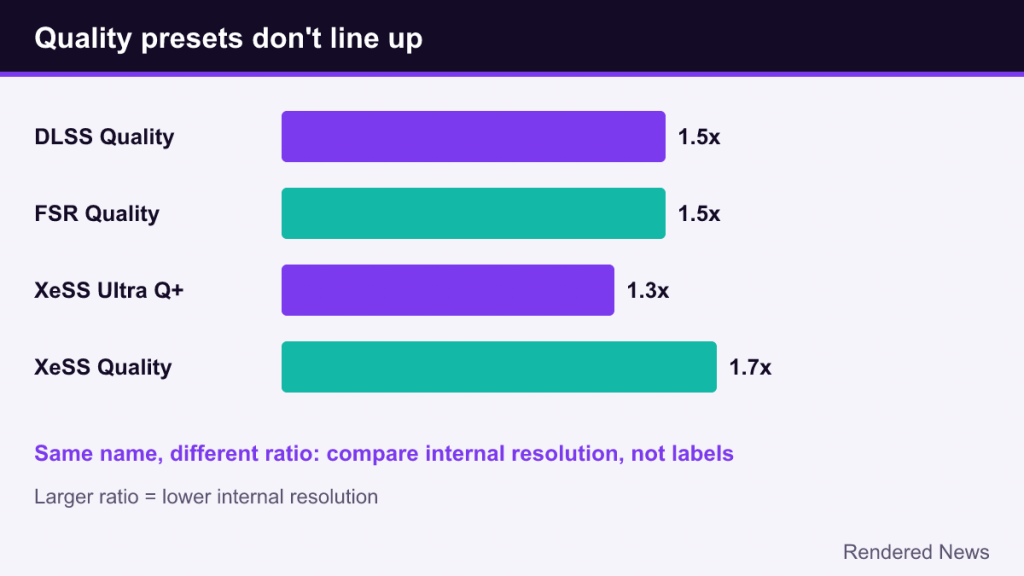
All three use names like Quality, Balanced and Performance, but the ratios behind them aren’t always the same. DLSS and FSR Quality mode both render at 1.5x below output resolution per axis (about 67%). Since XeSS 1.3, XeSS Quality uses a 1.7x ratio, closer to what other upscalers call Balanced, and Intel added an Ultra Quality Plus mode at 1.3x. Comparing presets by name alone is therefore misleading; compare by internal resolution.
Common misconceptions
- “FSR is the open one, so it works the same everywhere.” Analytical FSR runs widely, but the ML-based FSR Upscaling targets specific Radeon hardware.
- “DLSS is just better ML.” DLSS’s distinguishing feature is also its constraint: it only runs on NVIDIA RTX hardware.
- “Upscalers are interchangeable.” They share inputs, but their models, history handling and sharpening differ, so the same game can look different with each.
- “DirectSR replaces vendor SDKs.” It is designed to unify upscaler integration, but as of our latest check it remained in preview, and frame generation is outside its upscaling focus.
The big picture
DLSS, FSR and XeSS began with very different strategies: NVIDIA bet on proprietary machine learning from day one, AMD on open, hand-tuned algorithms that ran everywhere, and Intel on ML with a cross-vendor fallback. By 2026 the strategies have converged on machine learning for top-quality results, with each vendor adding frame generation and latency tools around its upscaler. What still separates them is where the models run, how openly they are distributed, and how far each will reach beyond its own hardware.