Input Latency Explained: Render Queues, NVIDIA Reflex, AMD Anti-Lag and XeLL
Where input lag comes from inside a PC game, why render queues add delay, and how Reflex, Anti-Lag 2 and XeLL cut it, including with frame generation.

Frame rate tells you how often the picture updates. It does not tell you how long it takes for your mouse click to show up on screen. Those two numbers are related, but they are not the same, and a game can run at a high frame rate while still feeling sluggish. The gap between them is input latency, and a surprising share of it comes from how the CPU and GPU hand work to each other.
This guide explains what makes up latency in a PC game, why a GPU-bound game builds up a render queue, and how the three vendor technologies aimed at that queue, NVIDIA Reflex, AMD Anti-Lag 2 and Intel’s Xe Low Latency (XeLL), actually work. It stays on the software side; we are not covering mice, displays or network ping.
Click-to-Photon: Breaking Down System Latency
The cleanest definition comes from NVIDIA’s 2020 launch article for Reflex: system latency is the delay between a mouse or keyboard action and the resulting pixel change on the display. It is also called end-to-end or click-to-photon latency. It does not include network delay to a game server, which is a separate problem.
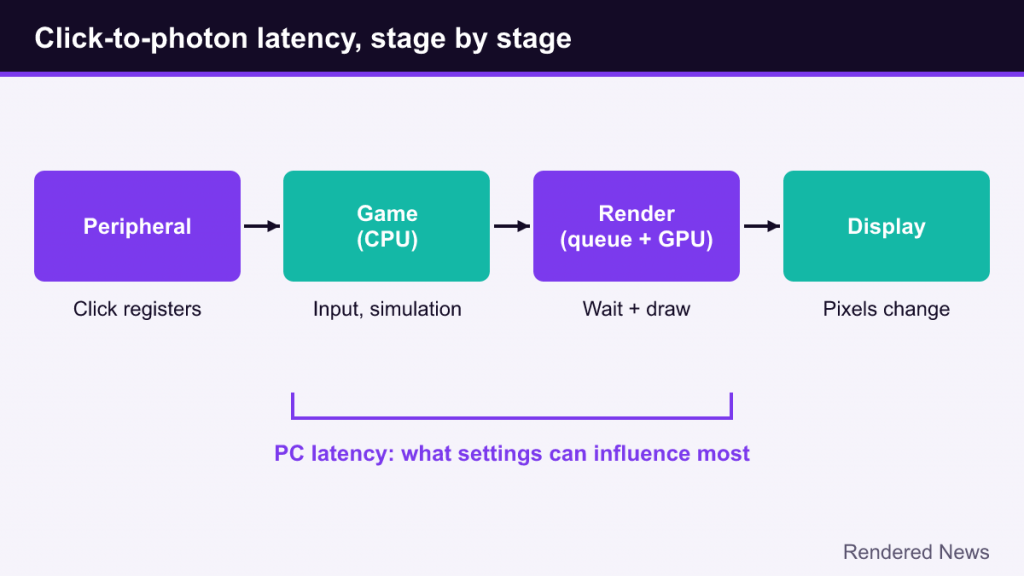
NVIDIA splits that chain into stages, and the breakdown is useful no matter what hardware you use:
- Peripheral latency: the time for the input device to register the action and send it to the PC.
- Game latency: the time for the CPU to process input, update the game world and prepare a frame for rendering.
- Render latency: the time from when a frame enters the render queue until the GPU finishes drawing it.
- Display latency: the time for the monitor to show the finished frame.
Game latency plus render latency is often called PC latency, and it is the part that game settings and the technologies below can influence most. A key detail hides inside render latency: it includes time a frame spends waiting in line before the GPU even starts on it.
Why the Render Queue Adds Delay
The CPU and GPU work in parallel, like two stations on an assembly line. The CPU runs game logic, physics and animation for frame N and records the draw commands. The GPU then renders frame N while the CPU moves on to frame N+1. This overlap is good for throughput: neither processor sits idle waiting for the other.
Trouble starts when the GPU is the slower station. If the CPU can prepare frames faster than the GPU can draw them, finished CPU work piles up. Graphics drivers and APIs allow a small number of frames to be queued ahead so the GPU never runs dry. NVIDIA’s description is simple: when the CPU prepares frames faster than the GPU can draw them, frames back up in a queue, and that backlog increases render latency.
Here is why that hurts. The input that frame N reflects was sampled when the CPU started working on it. If two frames are queued in front of it, your click has to wait for those older frames to render first. At 60 frames per second each frame takes about 16.7 milliseconds, so a couple of queued frames can add tens of milliseconds of delay without changing the frame rate at all. The game looks just as smooth but responds later.
When the CPU is the bottleneck, the queue tends to stay empty because the GPU is always waiting for new work. That is why latency-reduction tools have the most effect in GPU-bound scenarios, and NVIDIA says so explicitly about Reflex.
The Older Fixes: Queue Limits and Frame Caps
Before game-integrated tools existed, players had two blunt instruments.
Driver queue limits
Driver settings such as “maximum pre-rendered frames,” later renamed low latency mode in NVIDIA’s control panel, and AMD’s original driver-level Radeon Anti-Lag tried to restrict how far ahead the CPU could get. These help, but the driver sits outside the game. It can only delay or block submission at the point where the game hands work over, which is not necessarily the best moment from the game’s perspective.
Frame rate caps
Capping the frame rate a little below what the GPU can deliver also keeps the queue empty, because the GPU then finishes each frame with spare time. This works well and costs nothing in software support, but it requires the cap to stay below the GPU’s limit in every scene, which is hard when performance swings from one area to the next. Frame caps also interact with V-Sync and variable refresh, covered in our V-Sync and adaptive sync guide.
NVIDIA Reflex: Just-in-Time CPU Work
NVIDIA introduced Reflex on September 1, 2020. Unlike a driver toggle, the Reflex SDK is integrated by the game developer. NVIDIA describes its core job as aligning game engine work to complete just in time for rendering, which removes the GPU render queue and reduces CPU back pressure.
Conceptually, Reflex measures how long the GPU is taking and delays the start of each CPU frame so it finishes right as the GPU becomes free. The CPU still does the same work, but it starts later, which means it samples your input later. The frame that reaches the screen therefore reflects a more recent click. Because the timing is controlled from inside the engine, Reflex can adapt every frame as the load changes, which a fixed frame cap cannot.
The SDK also includes a “Boost” option that NVIDIA says keeps GPU clocks high in CPU-bound situations, and markers that let tools measure PC latency. NVIDIA’s overlay and its Reflex Latency Analyzer, which is built into certain displays, use those markers to report latency numbers instead of frame rate alone.
Reflex 2 and Frame Warp
At CES 2025 NVIDIA announced Reflex 2, which adds a technique called Frame Warp. After a frame is rendered, Frame Warp shifts it based on the very latest mouse input just before it is displayed, and fills in the small gaps that the shift reveals. It borrows an idea long used in VR, where the image is reprojected to match the newest head position. Support depends on game integration, so check NVIDIA’s pages for which titles use it.
AMD Anti-Lag 2: Moving the Delay Into the Game
AMD’s first Radeon Anti-Lag was a driver feature. Anti-Lag 2 is the game-integrated successor, distributed as an SDK on AMD’s GPUOpen site. AMD’s integration guide explains the key difference clearly: Anti-Lag 2 does a similar job to the driver version, but the point where the delay is inserted is now inside the game’s own logic, just before the game samples the mouse, keyboard or gamepad.
That placement is the whole trick. Inserting a wait right before input sampling means that when the CPU finally reads your input, the frame built from it will move through the pipeline with minimal waiting. The SDK is designed to reduce end-to-end latency in GPU-bound scenarios on Radeon GPUs, supports DirectX 11 and 12, includes an optional frame rate limiter, and has an Unreal Engine plugin. Its debugging guidance even describes the expected result in frames: with Anti-Lag 2 active, latency measured in frames should land roughly between one and two.
Intel XeLL: Latency Reduction Built Around Frame Generation
Intel’s Xe Low Latency arrived as part of XeSS 2, alongside XeSS Super Resolution and XeSS Frame Generation. It follows the same principle as Reflex and Anti-Lag 2: keep the CPU from running ahead of the GPU so that work is submitted just in time, removing the queue. Intel’s XeSS 2 whitepaper puts the potential reduction at up to 45% compared with standard rendering, which is a vendor best case rather than a typical result.
XeLL is tightly tied to frame generation. Intel’s developer guide lists XeLL integration as a prerequisite for XeSS Frame Generation, and its Unreal Engine plugin turns XeLL on when frame generation is enabled. Our Intel XeSS explainer covers the rest of that suite.
| Technology | Vendor | Where it acts | Main job |
|---|---|---|---|
| Reflex | NVIDIA | Game-integrated SDK | Just-in-time CPU submission, latency markers |
| Reflex 2 (Frame Warp) | NVIDIA | Game-integrated SDK | Late reprojection with newest mouse input |
| Anti-Lag 2 | AMD | Game-integrated SDK | Delay inserted just before input sampling |
| XeLL | Intel | Game-integrated SDK | Queue removal; required for XeSS Frame Generation |
Frame Generation and Latency
Frame generation is where latency tools stop being optional. Interpolation-based frame generation creates a new frame between two real ones, which means the newest real frame has to be held back until the generated frame is shown. That waiting adds latency on top of whatever the base frame rate already costs. Our frame generation explainer walks through the mechanics.
Every vendor answers this the same way: pair frame generation with its latency technology. DLSS Frame Generation is paired with Reflex, AMD promotes Anti-Lag 2 alongside its FSR frame generation, and Intel requires XeLL for XeSS Frame Generation. The latency tool removes the queue delay, which offsets some or all of the extra wait introduced by holding back a real frame.
This also explains a common confusion. Frame generation can raise the displayed frame rate dramatically, but responsiveness still follows the base frame rate that the game actually simulates. A game generating frames from a low base rate will look smoother than it feels.
Practical Takeaways and Common Mistakes
- Use the in-game option when it exists. A game-integrated technology knows where input is sampled and can time work accordingly. Driver-level queue limits are a fallback for games without it.
- Don’t expect much in CPU-bound games. If the GPU is waiting for the CPU, there is little or no queue to remove.
- Don’t judge by FPS counters. Latency reduction may lower the frame rate slightly because the CPU deliberately waits. Responsiveness can still improve. Use a latency overlay if the game or vendor tools offer one.
- Don’t stack overlapping limiters blindly. A game’s own latency mode, a driver limiter and an external frame cap can fight each other. Change one thing at a time.
- Remember the base frame rate. No latency tool fixes a game that is simply running slowly. Lowering settings or the render resolution reduces the time each frame takes, which shortens every stage of the chain.
Latency is the half of performance that frame rate counters leave out. Once you understand that the render queue converts spare CPU speed into waiting time, it becomes clear why every major vendor now ships a technology whose whole purpose is to make the CPU wait a little longer before it starts.