DLSS Transformer vs CNN Model: What Changed and Why It Matters
Why NVIDIA moved DLSS from convolutional networks to transformers, what the second-gen model in DLSS 4.5 changed, and how presets J, K, L and M fit in.
For most of its life, DLSS ran on a convolutional neural network, or CNN. In January 2025 NVIDIA switched its core upscaling, anti-aliasing and denoising features to a different kind of network: a transformer. A year later, at CES 2026, it announced a second-generation transformer as part of DLSS 4.5. Both changes kept the same name on the settings menu, so it is easy to miss that the thing doing the work underneath is a different model.
This article covers what the two architectures are, why the switch matters for image quality, what it costs in performance, and how the preset letters you see in the NVIDIA App and in overlays map to each model. If you want the broader picture of the DLSS feature family first, start with our DLSS explainer.
What DLSS Is Actually Asking the Network to Do
Every version of DLSS Super Resolution since DLSS 2 has worked as a temporal upscaler. The game renders each frame at a lower internal resolution, with a slightly different sub-pixel offset (jitter) each frame. It then hands the upscaler that low-resolution color image plus motion vectors, which say how each pixel moved since the last frame, and a depth buffer. The upscaler has to decide, pixel by pixel, how much to trust the history it built up over previous frames and how much to trust the new sample.
That decision is the hard part. If the upscaler trusts history too much, moving objects leave trails, which players call ghosting. If it trusts history too little, the image loses the extra detail that accumulation provides and fine edges shimmer. Hand-tuned temporal anti-aliasing uses fixed rules for this, like clamping history colors to the range of nearby new pixels. DLSS replaces those rules with a trained neural network that has seen huge numbers of examples of what the “right” answer looks like, rendered at very high quality offline.
How the CNN Model Worked
A convolutional neural network processes an image by sliding small filters across it. Each filter looks at a small neighborhood of pixels, and stacking many layers lets later layers see a wider area indirectly. CNNs have been the backbone of image processing for over a decade because they are efficient: the same small set of weights is reused everywhere in the image, and the operation maps very well to GPU hardware.
A CNN is very good at local patterns, but has a harder time reasoning about relationships between distant parts of the frame. When NVIDIA introduced its transformer model, it said its team had reached the limits of what was possible with the CNN architecture after years of refinement. The 2026 announcement framed the history as eight years of research on DLSS, six of them spent refining CNNs.
In practice, the late CNN models were already strong. The known weak spots were the ones you would expect from a local, fixed-window approach: ghosting behind fast-moving objects, smearing on particles and thin geometry, and some loss of texture detail in motion, especially at aggressive quality modes like Performance and Ultra Performance.
What a Transformer Brings
Transformers are the architecture behind large language models, but the core idea transfers to images. Instead of only looking at a fixed neighborhood, a transformer uses a mechanism called self-attention. In simplified terms, each part of the input can weigh how relevant every other part is, and draw information from wherever it is most useful. For images, the frame is usually split into patches, and the network learns which patches matter to each other.
NVIDIA described the DLSS 4 model as a vision transformer that evaluates the relative importance of each pixel across the entire frame and over multiple frames. It also said the model uses twice as many parameters as the previous CNN. The practical promise of that global view is better judgment on exactly the problems CNNs struggled with: which history to keep when an object moves across a detailed background, how to reconstruct a thin power line or a fence that only partly shows up in each low-resolution frame, and how to keep surfaces stable when the camera moves.
NVIDIA’s claims for the first transformer model were greater temporal stability, less ghosting, higher detail in motion and smoother edges.
DLSS 4: The First Transformer Generation
The transformer model was announced on January 6, 2025, at CES, alongside DLSS Multi Frame Generation. It applied to three features at once:
- DLSS Super Resolution, the upscaler, initially released as a beta.
- DLAA, which uses the same network at native resolution as an anti-aliasing method.
- DLSS Ray Reconstruction, the AI denoiser for ray-traced and path-traced effects.
A key point was that the transformer model was not limited to the newest GPUs. NVIDIA stated that games with these features could be upgraded on all GeForce RTX GPUs, going back to the RTX 20 series. Multi Frame Generation was the hardware-gated feature that generation; the image-quality model was not. For how generated frames work, see our frame generation explainer.
The first public transformer preset for Super Resolution was Preset J. On January 30, 2025, NVIDIA updated the “Latest” option in its app to Preset K, which it described as a small refinement of J with better temporal stability, less ghosting and more detail in motion. Ray Reconstruction stayed on its own transformer preset at that point.
DLSS 4.5: The Second-Generation Transformer
At CES 2026, with an article dated January 6, 2026, NVIDIA announced DLSS 4.5 with a second-generation transformer model for Super Resolution. It was made available the same day through an NVIDIA App update, with override support for over 400 games and apps at launch, and NVIDIA called it the first major upgrade to the transformer architecture. The company listed these changes:
- About five times the compute of the original transformer model.
- Training on a significantly expanded, higher-fidelity dataset.
- Training and running in linear color space, which NVIDIA said avoids the muted lighting and crushed shadows that earlier models could produce.
- Improved edge sharpness, anti-aliasing and motion clarity, with less ghosting and trailing and better temporal stability.
NVIDIA also made a bolder claim about the lower quality modes: that Performance mode could look comparable to or better than native resolution, and that Ultra Performance had become viable for 4K output. Treat that as a vendor claim: “better than native” usually means better than native with the game’s own TAA.
The update also changed the labels in the NVIDIA App. Two new presets appeared: Preset M and Preset L. NVIDIA positioned Model M for Performance mode and Model L for Ultra Performance at 4K, while noting that both also support Quality, Balanced and DLAA.
Ray Reconstruction gets its turn
The DLSS 4.5 launch covered Super Resolution only. On May 31, 2026, NVIDIA announced DLSS 4.5 Ray Reconstruction, also built on a second-generation transformer, with release planned through the NVIDIA App in August 2026 for all GeForce RTX GPUs. NVIDIA said the new denoiser had 35% more compute and 20% more parameters, with performance close to the previous model, and was trained on a larger dataset. Our comparison of DLSS, FSR and XeSS covers how the competing upscalers approach the same problem.
The Compute Cost, and Why Your GPU Generation Matters
Better models are not free. A neural upscaler runs every frame, so its execution time comes straight out of the frame budget. The first transformer was already heavier than the CNN, and NVIDIA said the second generation uses roughly five times the compute of the first.
NVIDIA’s answer for newer hardware is reduced precision. According to the company, RTX 40 and RTX 50 series GPUs run the second-gen model in FP8 precision, which doubles inference throughput and keeps the cost of the new model to a minor performance hit compared with the first transformer. RTX 20 and RTX 30 GPUs do not have native FP8 support, so Models M and L hit them harder. NVIDIA’s own guidance is that owners of those cards may prefer Model K, the DLSS 4.0 transformer, for a better balance of speed and quality.
There is a real argument for running a heavier model at a lower internal resolution, for example Preset M in Performance mode instead of Preset K in Quality mode, because the bigger network can recover more detail from fewer pixels. But whether that comes out ahead depends on the GPU, the resolution and the game. There is no universal answer, which is exactly why NVIDIA’s “Recommended” setting picks different presets per quality mode.
Presets Explained: J, K, L and M
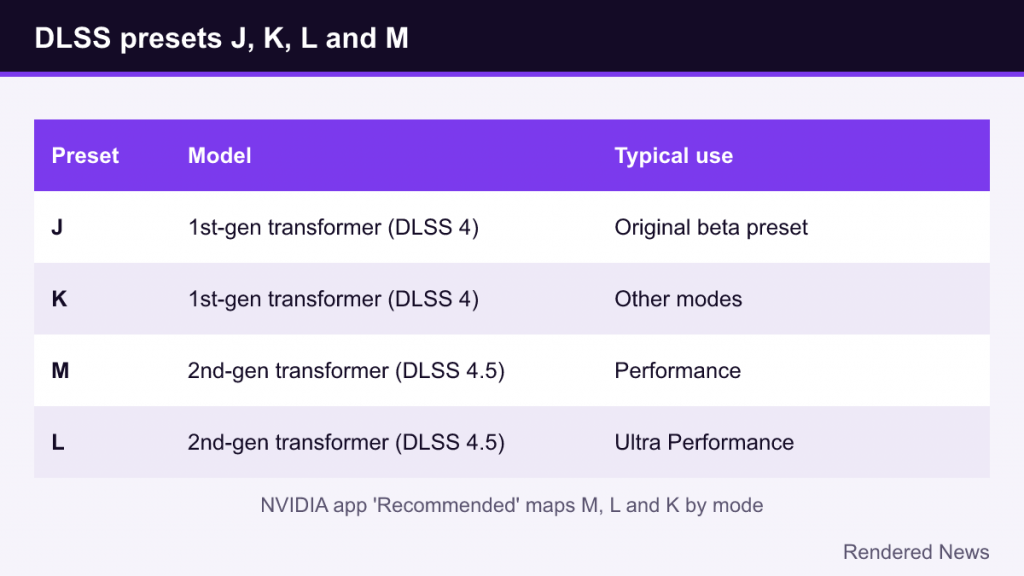
DLSS presets are simply different trained models (or tuned variants) that a game or driver can select. Older CNN models used earlier letters, and games often shipped with whichever preset the developers tested. As of 2026, the presets you are most likely to see are these:
| Preset | Model | Typical use |
|---|---|---|
| J | First-gen transformer (DLSS 4) | Original transformer beta preset |
| K | First-gen transformer (DLSS 4) | Refinement of J; NVIDIA’s suggested choice on RTX 20/30 |
| M | Second-gen transformer (DLSS 4.5) | Targeted at Performance mode; also supports Quality, Balanced, DLAA |
| L | Second-gen transformer (DLSS 4.5) | Targeted at Ultra Performance at 4K |
With DLSS 4.5, the NVIDIA App’s “Recommended” option replaced the old “Latest” option. Under Recommended, NVIDIA maps Preset M to Performance mode, Preset L to Ultra Performance, and Preset K to the remaining modes. In other words, the app does not blindly push the heaviest model everywhere; it uses the second-gen model where its extra reconstruction ability matters most, which is the lower render scales.
Using the NVIDIA App Override
Games bundle a specific DLSS library and preset when they ship, and many never get updated. The override in the NVIDIA App lets the driver swap in a newer model for games on its supported list. The process NVIDIA describes is straightforward:
- Enable DLSS Super Resolution (or DLAA, or Ray Reconstruction) inside the game first. The override only replaces a feature the game is already using.
- In the NVIDIA App, open the Graphics tab and find DLSS Override – Model Presets, either globally or for a specific game.
- Choose Recommended, or pick a specific preset manually if you want to test one.
- Apply, then launch the game.
To confirm what is running, NVIDIA points to the overlay’s statistics view, which can show the active DLSS model. A game that is not on the override list may simply keep its own preset.
Two quick cautions: the override cannot add DLSS to a game that lacks it, and most of the transformer’s gains show up in motion, so judge it while moving rather than from still screenshots.
What Still Goes Wrong
Transformers reduce temporal artifacts; they do not eliminate them. Upscalers still depend on the game providing correct motion vectors. Effects that have no proper motion data, such as some particles, animated textures, reflections and transparent surfaces, can still smear or flicker. At very low render scales the network still has to guess at missing information. Reviews of DLSS 4.5 also noted that the gains came with a performance trade-off that varies by GPU generation.
The bigger story is the direction of travel. Rendered pixels are increasingly input for a learned reconstruction step, which is why the same “DLSS Quality” setting can look different from one year to the next.