Forward vs Deferred Rendering: How Engines Handle Lots of Lights
How forward, deferred, Forward+ and clustered rendering handle many lights, and why Unreal, Unity and Godot each made different choices.
Every rendered pixel has to answer the same question: which lights reach this point, and what color does the surface become as a result? With one sun and a handful of lamps that is easy. With a city street full of neon signs, car headlights, muzzle flashes and flickering windows, it becomes one of the central problems a renderer has to solve. The way an engine organizes that work is called its rendering path, and the two big families are forward and deferred rendering.
Neither is simply “better.” That is why Unreal Engine defaults to deferred shading, Godot 4 built its main renderer around a forward approach, and Unity’s Universal Render Pipeline lets you pick.
The Problem: Lights Multiply Work
To shade a pixel, the renderer evaluates a lighting equation. It reads the surface’s material properties (base color, roughness, metalness, normal direction), then for each light computes how much energy arrives and how much bounces toward the camera. If you have read our explainer on physically based rendering, this is where those material maps actually get used.
The cost grows with two numbers: how many pixels get shaded and how many lights each pixel considers. Looping over every light for every pixel works for five lights but collapses at five hundred. Worse, the same pixel can be shaded several times when objects overlap on screen, wasted effort called overdraw. Forward and deferred rendering are two strategies for reducing that multiplication.
Forward Rendering: Shade While You Draw
Forward rendering is the classic approach and the one that maps most directly onto the rasterization pipeline. Each object is drawn, its triangles are rasterized into fragments, and the pixel shader computes the final lit color right away, looping over the lights that affect that object. The result goes straight into the frame buffer.
Early forward renderers handled lighting in one of two ways:
- Multi-pass forward: draw the object once for the base light, then draw it again, additively blended, for each extra light. Simple, but every light means another full draw of the geometry.
- Single-pass with a light limit: pass a small, fixed list of the most important lights into the shader and evaluate them all in one go. Faster, but objects can only receive a limited number of lights, and the engine has to decide which ones matter most.
Unity’s original Forward path in the Universal Render Pipeline (URP) still works along these lines, with a per-object light limit set in the pipeline asset. That limit is the classic weakness of forward rendering: once a scene has many small dynamic lights, objects either lose lights they should receive or the cost balloons.
What forward rendering does well
- MSAA works naturally. Because shading happens during rasterization, hardware multisample anti-aliasing can resolve edges cheaply. Our anti-aliasing guide explains why MSAA is so effective on geometric edges.
- Transparency is straightforward. Glass, water, particles and foliage cards can be drawn and lit in the same way as opaque objects, blended in back-to-front order.
- Material flexibility. Every shader can compute lighting however it wants, so unusual materials (toon shading, hair, special skin models) are easy to write.
- Low memory and bandwidth. There are no large intermediate buffers, which matters a great deal on mobile GPUs and in VR.
Deferred Shading and the G-Buffer
Deferred shading flips the order. Instead of lighting each object as it is drawn, the renderer first draws all opaque geometry and stores only the surface information for each pixel into a set of render targets known collectively as the G-buffer (geometry buffer). Lighting is then computed later, in screen space, once per pixel.
A typical frame looks like this:
- Geometry pass: draw every opaque object, writing material data to the G-buffer. Common channels include base color (albedo), world-space or view-space normal, roughness, metalness, specular, ambient occlusion, an emissive term, and a material ID. Depth comes from the depth buffer.
- Lighting pass: for each light, figure out which pixels it touches (by drawing a light volume such as a sphere or cone, or by working in screen tiles), read the G-buffer at those pixels, and accumulate lighting.
- Forward pass for leftovers: draw transparent objects and any special materials the G-buffer cannot describe using a forward path, blending them on top.
- Post-processing: tone mapping, bloom, anti-aliasing and so on.
The key insight is that the expensive lighting work now happens only for pixels that are actually visible in the final image. Overdraw in the geometry pass costs only cheap G-buffer writes, not full lighting. And each light only touches the pixels inside its range, so a scene can carry hundreds of small lights without each object needing a light list.
The idea comes from academic research of the late 1980s and early 1990s, but it became mainstream in games during the Xbox 360 and PlayStation 3 era, when hardware could finally hold several full-screen buffers.
The costs of going deferred
- Memory and bandwidth: a G-buffer is several full-resolution render targets. Writing them and reading them back every frame uses a lot of memory bandwidth, which is the resource mobile and standalone VR hardware has least of.
- MSAA becomes awkward: to use MSAA, every G-buffer target would need multiple samples per pixel, multiplying memory, and lighting would have to run per sample at edges. Most deferred engines drop MSAA and rely on post-process or temporal anti-aliasing instead.
- Transparency does not fit: a G-buffer stores one surface per pixel, so a glass window in front of a wall cannot be represented. Transparent objects go through a separate forward pass, which is why their lighting sometimes looks slightly different from the rest of the scene.
- Material variety is limited: every material has to squeeze its data into the same G-buffer layout. Special shading models need extra bits, flags or a fallback forward path.
Deferred Lighting, Tiles and Clusters
Engineers did not stop at the basic split. Several variations try to keep deferred’s strengths while trimming its costs.
Tiled deferred shading
The screen is divided into small tiles (for example 16 by 16 pixels). A compute shader works out which lights overlap each tile, using the tile’s depth range to cull the rest. Each tile then reads the G-buffer once and loops over only its own short light list.
Forward+ (tiled forward)
The same tile idea can be applied to forward rendering. A depth pre-pass fills the depth buffer first, a compute shader builds a per-tile light list, and then the normal forward pass shades each pixel using only the lights in its tile. This approach, popularized by AMD research and demos around 2012 under the name Forward+, removes forward rendering’s per-object light limit while keeping MSAA, transparency and material freedom.
Clustered shading
Tiles are two-dimensional, which causes problems when a tile spans a big depth range, such as the edge of a character against a distant sky. Clustered shading divides the view frustum into a 3D grid of cells (clusters) along the depth axis as well, so each cluster’s light list is tighter. Clustering works for both forward and deferred renderers and is now one of the most common ways to organize lights in modern engines.
How Unreal, Unity and Godot Choose
The three engines most beginners meet each lean a different way, and the reasons say a lot about their target platforms. The table below summarizes the defaults as described in each engine’s documentation as of 2026.
| Engine / pipeline | Default approach | Notes |
|---|---|---|
| Unreal Engine 5 | Deferred | Optional forward shading renderer, aimed mainly at VR; Nanite and Lumen require the deferred path |
| Unity URP | Selectable | Forward, Forward+, Deferred, and in newer Unity 6 releases Deferred+ |
| Unity HDRP | Deferred or forward | Lit shader mode can be set per project or per camera; uses tiled/clustered light lists |
| Godot 4 Forward+ | Clustered forward | Desktop-focused, groups lights in a frustum-aligned grid using a compute shader |
| Godot 4 Mobile / Compatibility | Forward | Simpler forward renderers for mobile and low-end or web targets |
Unreal Engine
Epic’s documentation describes deferred rendering as Unreal’s default because it offers the most versatility and access to the most rendering features. The big UE5 systems are built on it: Nanite and Lumen both require the deferred renderer and are not available when forward shading is enabled. The optional forward shading renderer exists mainly for VR, where it is generally faster, supports MSAA (which looks sharper than temporal AA when the camera is strapped to a moving head) and avoids bandwidth-heavy intermediate buffers. Meta’s developer documentation recommends it for Quest development.
Unity
Unity’s URP sets the rendering path in the Universal Renderer asset. Classic Forward has a per-object light limit; Forward+ removes it by binning lights. Deferred has no limit on how many lights can affect an opaque object, but it needs a modern shader model and does not run on OpenGL or OpenGL ES; builds for those APIs fall back to the forward path. Newer Unity 6 releases add a Deferred+ path, which uses Forward+ rather than plain Forward for the transparent and forward-only passes. HDRP, Unity’s high-end pipeline, supports both deferred and forward lit modes.
Godot
Godot’s contributor documentation explains that Godot 4 deliberately chose forward over deferred. Its argument: forward rendering, especially with clustered lighting, gives a better balance of performance and flexibility, and it supports MSAA without workarounds. The Forward+ renderer uses a compute shader to sort lights into a frustum-aligned grid, so each pixel only evaluates lights in its cell. Godot’s docs also note this approach is much less efficient on mobile GPUs, which is why the separate Mobile renderer is a simpler single-pass forward design. The Compatibility renderer, built on OpenGL, targets older hardware and web exports and trades away most high-end features.
Trade-Offs Side by Side
| Concern | Classic forward | Forward+ / clustered forward | Deferred |
|---|---|---|---|
| Many dynamic lights | Weak (per-object limits) | Strong | Strong |
| MSAA | Native | Native | Difficult, usually replaced by TAA |
| Transparency | Natural | Natural | Needs a separate forward pass |
| Custom materials | Very flexible | Very flexible | Limited by G-buffer layout |
| Memory bandwidth | Low | Low to moderate | High |
| Screen-space effects (SSAO, SSR) | Need extra passes for normals | Need extra passes for normals | Get G-buffer data for free |
| Overdraw cost | Full shading per layer unless depth pre-pass | Reduced by depth pre-pass | Only cheap G-buffer writes |
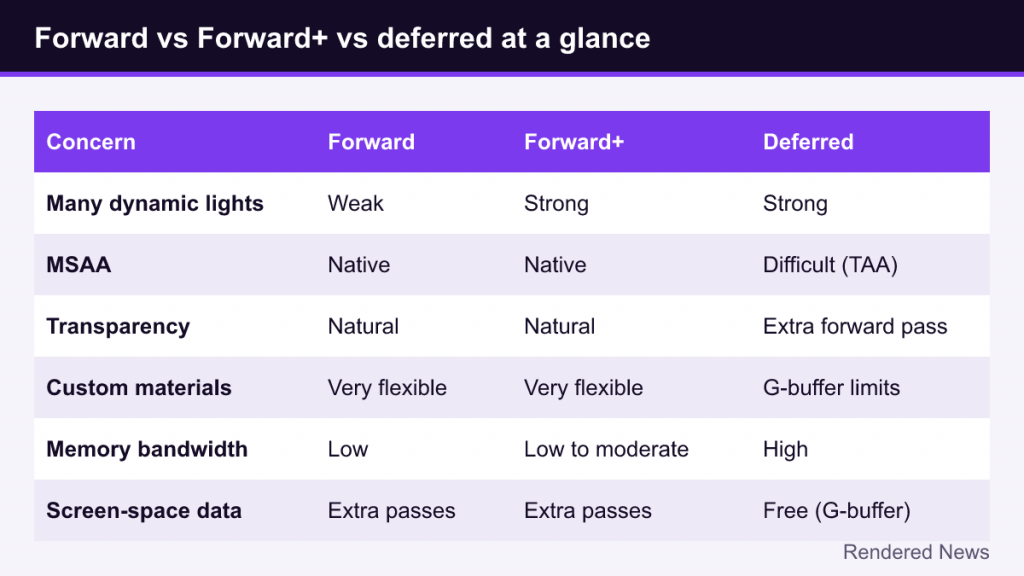
The screen-space row matters more than it looks: effects like SSAO and screen-space reflections need per-pixel normals and depth, which a deferred renderer already has. That is one reason high-end PC and console engines tend to stay deferred.
Which Should You Use in Your Own Project?
If you are using an engine rather than writing your own renderer, the practical guidance is fairly simple:
- Mobile, standalone VR or web: forward (or Forward+ where supported). Bandwidth is precious and MSAA is valuable.
- PC or console with lots of dynamic lights and heavy screen-space or ray-traced effects: deferred, or a hybrid such as Unity’s Deferred+.
- Stylized games with custom shading: forward is often easier, because you are not fighting a fixed G-buffer layout.
Whatever you choose, profile on your target hardware; engines that offer more than one path, like Unity URP, make it easy to compare both on the same scene. Note that “forward is old” is a misconception: clustered forward is a thoroughly modern technique, and the many-lights gap that once favored deferred has largely closed.
Bounced, indirect light is a separate problem, covered in our article on global illumination.